

The following illustration shows most of the elements of a graphical user interface.
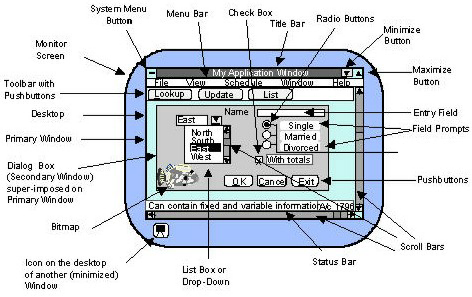
The illustration does not show group boxes, literals, OLE areas, or OLE custom controls.
The following table lists all GUI elements for windows and dialog boxes.
|
|
|
|
Dialog Box |
Provides Action |
Provides Data |
User Aid Only |
|---|---|---|---|---|---|---|
|
Title Bar |
Contains the name of the window or dialog box. |
Yes |
Yes |
No |
No |
Yes |
|
Menu Bar |
Clicking each option in the menu bar reveals a drop-down list of menu items (not shown) designed by the application developer. Each menu item triggers its own piece of application logic. |
Yes |
No |
Yes |
No |
No |
|
Tool Bar |
Optional element that may contain only push buttons for pieces of application logic. |
Yes |
No |
Yes |
No |
No |
|
Status Bar |
Optional element that displays information, typically about the status of the process. |
Yes |
No |
No |
No |
Yes |
|
Scroll Bar |
GUI scrolling device that allows the user to display information that is not visible on the screen. |
Yes |
Yes |
Yes |
No |
No |
|
System Menu |
Operating system menu under the icon on the top left corner of the window. |
Yes |
No |
Yes |
No |
No |
|
Minimize Button |
Shrinks the window to an icon on the desktop, where it can be maximized when you next need to view the window. |
Yes |
Yes |
Yes |
No |
No |
|
Maximize Button |
Displays the window in the largest possible size, or in the size it was first opened, or last resized. |
Yes |
Yes |
Yes |
No |
No |
|
Check Box |
Control that acts like a switch (on/off, yes/no, true/false, and so on). |
Yes |
Yes |
Yes |
No |
No |
|
Group Box |
Margin box drawn around a collection of logically related fields. |
Yes |
Yes |
No |
No |
Yes |
|
List Box |
Control that displays a series of values as a list. |
Yes |
Yes |
No |
Yes |
No |
|
Entry Field |
Control into which the user types information. |
Yes |
Yes |
No |
Yes |
No |
|
Field Prompt |
Text label that identifies a selection or entry field. |
Yes |
Yes |
No |
No |
Yes |
|
Literal |
Text that is displayed but cannot be changed. |
Yes |
Yes |
No |
No |
Yes |
|
Radio Button |
Control that offers one choice from among a group of choices. |
Yes |
Yes |
Yes |
No |
No |
|
Push button |
Control that performs an action immediately when it is selected. |
Yes |
Yes |
Yes |
No |
No |
|
Icon |
Small bitmap picture that represents a minimized window on the desktop. |
Yes |
Yes |
Yes |
No |
No |
|
Bitmaps |
Graphics used to distinguish push buttons and as literals or icons. |
Yes |
Yes |
No |
No |
Yes |
|
OLE Area |
In Win32 applications, an embedded area that allows communication with other applications. |
Yes |
Yes |
Yes |
Yes |
No |
|
OLE Custom Control (OCX) |
In Win32 applications, an embedded control, such as a spin button. |
Yes |
Yes |
Yes |
Yes |
No |
|
Copyright © 2013 CA.
All rights reserved.
|
|