

Procedure interaction can occur through a flow or Procedure Step USE statement:
In a client/server environment, each client procedure may be associated with a procedure action diagram and a graphical user interface (GUI) display. You define the possible series of interactions between a user and the procedures in a business system through these associated GUIs. The GUI can be a window and associated dialog boxes as needed. You also determine when there is a need to communicate with a server procedure to gather the correct data for the user request.
An interaction refers to a single instance in which a user requests an action of the system and the system responds.
From the user's perspective, an interaction involves this procedure:
The following illustration shows a very simple interaction that begins with a user entering data on the starting window or dialog box.
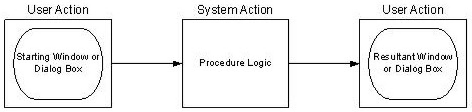
When the user indicates that data entry is complete by selecting a menu item, push button, or a toolbar item, the system responds by processing the data according to the procedure definition. When processing is complete, the resulting window or dialog box is presented to the user. Remember that windows and dialog boxes are associated only with client procedures.
From the developer's perspective, an interaction involves an indeterminate number of procedures. Remember that the client procedure is what contains a window plus one or more associated dialog boxes. There may be a need to communicate with other client and/or server procedures before returning a window or dialog box to the user.
There are two possible procedure interactions:
The user does not see the procedure interactions. The window or dialog box associated with a client procedure presents only the data.
|
Copyright © 2013 CA.
All rights reserved.
|
|