

A command is a special concept in system design using CA Gen. It allows you to specify how users can influence procedure execution. This special attribute is defined here because the concept of a command is important to the discussion of procedure definition.
Commonly used commands should be standardized across the system.
You can associate a command with a graphical object, such as a push button or menu item, on a window. At execution time, a user can activate that graphical object by pressing the push button to cause a procedure to behave in a desired manner.
For example, the following figure illustrates a client procedure that provides the user a list of customers. The user can add a new customer or choose one to change or delete.
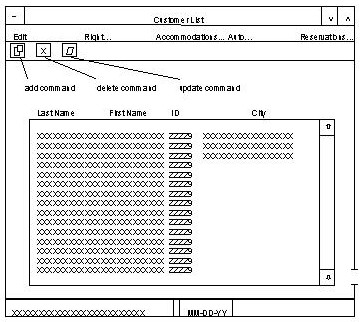
The user should be allowed to choose whether to add, change, or delete a customer at execution time by activating the appropriate graphical object. These commands are assigned and sent to the server as illustrated in the following figure.
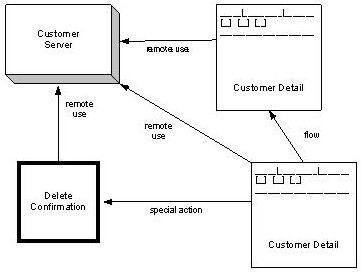
Commands tell the server what action should be performed.
The following figure shows the statements for the procedure step Customer Server.
Procedure Step: CUSTOMER_SERVER

   1-    -----  CUSTOMER_SERVER
   2-   |                IMPORTS: Entity View import customer
   3-   |                EXPORTS: Entity View import customer
   4-   |       EXIT STATE IS prossing_ok
   5-   |   --- CASE OF COMMAND
   6-   |  |--- CASE delete
   7-   |  |    USE delete_customer
   8-   |  |                WHICH IMPORTS: Entity View import customer
   9-   |  |                WHICH EXPORTS: Entity View export customer
  10-   |  |--- CASE add
  11-   |  |    USE add_customer
  12-   |  |                WHICH IMPORTS: Entity View import customer
  13-   |  |                WHICH EXPORTS: Entity View export customer
  14-   |  |--- CASE update
  15-   |  |    USE update_customer
  16-   |  |                WHICH IMPORTS: Entity View import customer
  17-   |   ---             WHICH EXPORTS: Entity View import customer
  18-    ------
|
Copyright © 2013 CA.
All rights reserved.
|
|