

The Cross-Context Flows feature allows load modules that are deployed in separate web applications to interact. To support this feature, the location of each load module must be specified.
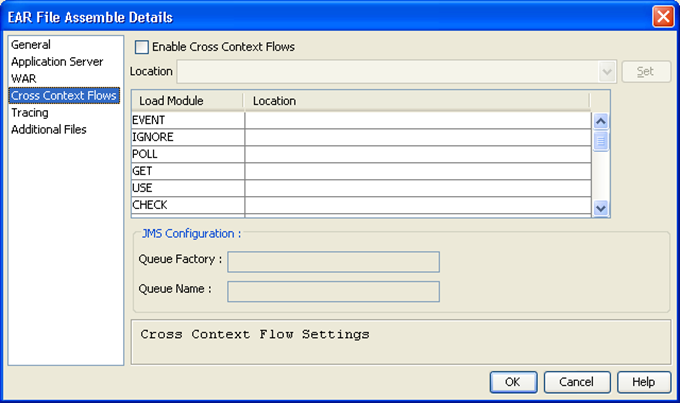
Selecting the Enable Cross-Context Flows check box activates Cross-Context flows for the current assembly. Browser Controlled History is not allowed for Cross-Context applications. Build Tool does not allow you to select both Browser Controlled History and Cross-Context Flows.
The table provides a list of all of the load modules that are referenced by the load modules that are selected in the main Build Tool panel.
Some of the listed load modules are local to the current web application that is being assembled. There is no need to specify a mapping for local load modules.
A location should be specified for any remote load modules in the corresponding Location field. If the location of a remote load module is not specified, then an error occurs at runtime if an attempt is made to flow to it.
Enter the fully qualified URL of the context where the load module is deployed. For example, when configuring context CBD1 and it references CBD2LM2 in web application CBD2, enter the URL as http://myserver/CBD2. The CBD2 in the URL would be the context name that is provided while assembling web application CBD2.
To enter a location URL, type the fully qualified URL into the Location field to the right of the load module name to configure. Alternatively, select multiple load modules to be deployed in the same context and enter the Location URL into the Location field. After entering the URL, click Set to populate the Location fields for each of the selected load modules.
The JMS Configuration section of the dialog contains the following fields:
Specifies the JNDI name of the JMS Connection Factory that is configured for the application server.
Specifies the JNDI name of the JMS Queue that is configured for the application server.
|
Copyright © 2015 CA Technologies.
All rights reserved.
|
|