

You can use the Additional Files Feature of the Assemble Utility to assemble different Operation Libraries that are built in different models.
When you select Additional Files from the MSI GUI or .NET Assemble Details panel, the following dialog appears:
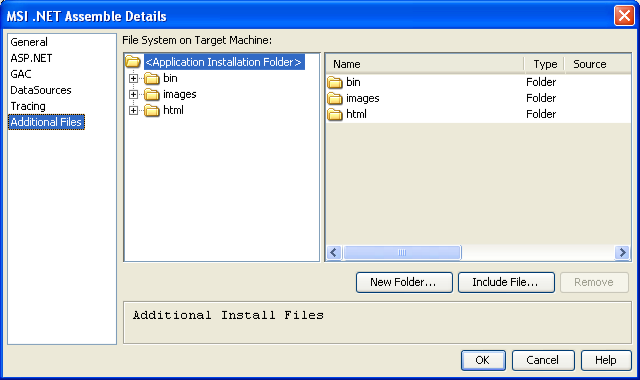
The fields in the Additional Files dialog are described in the following list:
Displays the tree list showing the folder structure that is installed on the target machine. Folders can be added and removed as desired. The folder structure is pre-populated with some default folders that are installed based on the Load Modules that are selected for the assemble.
Displays a table listing the details for the currently selected folder. The contents of the folder are either files (that have been included) or sub-folders. For each item, the name, type (File, Folder), and the source location of the included file is shown.
Adds a new sub-folder below the currently selected folder.
Opens a File chooser dialog to allow the assembler to select files off the current machine that is included into the MSI file in the current folder selected.
Removes the currently selected item. If the item is a file, then the file is removed from its folder. If the item is a folder, then the folder and all of its contents (files and sub-folders) is removed.
Note: This option makes it possible to specify additional files to be included in the MSI package.
Important! This feature is provided for your convenience, however, CA has no way of knowing whether these files are properly licensed on your deployment environment. Therefore, it is your responsibility to ensure proper licensing on the target machine.
|
Copyright © 2015 CA Technologies.
All rights reserved.
|
|