

A user can execute commands in three ways:
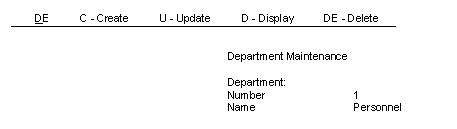
You can have Procedure Synthesis add an action bar to a screen when you select a selection list stereotype or an entity maintenance stereotype. When you apply the stereotype, Procedure Synthesis generates an Action Diagram that includes the logic to list commands on the action bar and provide a field for command entry. The letters D, C, and U direct the system to Display, Create, and Update, respectively. Since Display and Delete both start with the letter D, you can distinguish the Delete command with the two-character entry DE.
The following illustration is an example of a screen with a generated action bar.
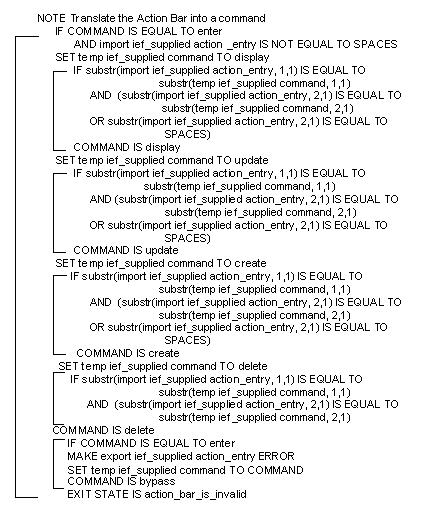
Procedure Synthesis generates the following statements when you choose to add an action bar for command entry:
If you generate an action bar, you do not need to assign the same commands to PF (function) keys. In addition, you should not use the Enter key to display or update options. See Use the Enter Command to Display and Use the Enter Command to Update.
You can also obtain the action bar functionality by using Command Synonyms and placing a command field on the screen. You may need to shorten the command field.
|
Copyright © 2014 CA.
All rights reserved.
|
|