

The second part of specifying selection conditions for a READ (and READ EACH) action is to add any relationship conditions.
The following illustration shows a relationship-condition:
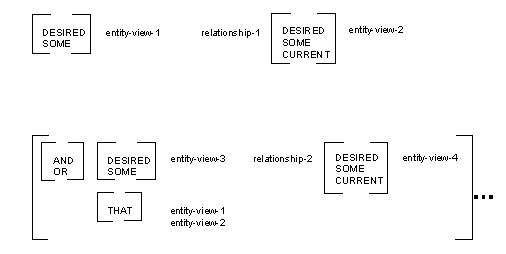
A relationship-condition must be a relationship between two entity action views.
Each reference to an entity action view is preceded by a view qualifier (DESIRED, SOME, CURRENT, or THAT). DESIRED refers to one of the views being read. SOME refers to any other entity action view. THAT refers to a view previously referenced by SOME. CURRENT refers to any entity action view previously populated by a READ or a CREATE action.
The following example shows how relationship conditions are used in Action Diagrams.
READ customer
order
WHERE DESIRED customer places DESIRED order
AND DESIRED order contains SOME order line
AND THAT order_line is for CURRENT product
This statement READs a CUSTOMER and ORDER pair satisfying the criterion of containing an ORDERLINE for the CURRENT PRODUCT.
Note: The Action Diagram tool does not offer THAT as a selection option, but the tool does insert THAT as an exception option. CA Gen inserts THAT in a WHERE clause if there is more than one qualifier beginning with SOME. CA Gen automatically translates the second and subsequent references to SOME entity view to read THAT entity view. This enhances the readability of complicated WHERE clauses.
Restriction: There is a restriction in the case where two entities, having a fully optional one-to-many relationship, are used in an entity action statement to retrieve all rows for the entity on the many sides of the relationship and the key of the other entity is tested for NULL. In this case, no other clauses or conditions are allowed in the entity action statement. For example, the use of IS NULL on a fully optional relationship to find records with NULL foreign keys is only supported for simple WHERE expressions. More complex WHERE expressions, containing an OR combined with the use of the IS NULL, in this particular scenario is not allowed.
|
Copyright © 2014 CA.
All rights reserved.
|
|