

Adding the READ action is the first step in building READ action statements. You can read one or more entities with one READ action. Specifying multiple entities (or entity action views) in the entity-view-list of the READ statement:
However, be careful when using multiple entities in READ statements as it may be necessary to generate SQL statements that are joins when multiple tables are read.
Cartesian joins, results in reading all rows of two or more tables, can seriously impact response time. The generated logic will take maximum advantage of denormalized data to attempt to avoid or reduce joins in generated logic.
Downstream Effects: The second benefit takes advantage of denormalization, or replication of data in multiple places. Denormalization is available in the Data Structure Diagram in technical design.
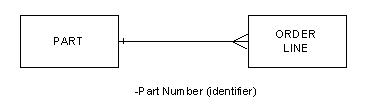
For example, consider a Data Model that contains two entity types, PART and ORDER LINE. PART contains the identifying attribute, Part Number. In the Data Structure Diagram, the relationship between PART and ORDER LINE is implemented by Part Number, which becomes a foreign key. In the database, Part Number is implemented in the PART table as a primary key. Part Number is implemented in the ORDER LINE table as a foreign key. Part Number becomes a denormalized field and is stored redundantly.
Carried one step further, the Action Diagram contains a READ statement that READs both PART and ORDER LINE and contains selection conditions relating PART to ORDER LINE. The resulting benefit occurs during Code Generation. The Code Generation Tool verifies that all fields it requires from PART (in this example, Part Number) are actually stored in ORDER LINE. The tool reads Part Number out of the ORDER LINE table rather than perform a join to the PART table, thereby accessing the database only once. Without the advantages of denormalization and the ability to read multiple views in a single READ statement, both PART and ORDER LINE would have appeared in separate READ statements. A join of the two tables representing each entity type in the database would be necessary to collect data from both.
A READ statement which reads multiple views should always contain a WHERE clause that connects the views in the READ list (relationship or attribute comparison). For example, if the relationship between PART and ORDER LINE were optional from ORDER LINE, you would not place both entity views on the READ list unless you only wanted to see those ORDER LINES that had a pairing to PART.
READ EACH repeating actions, also let you read multiple views. This diagram illustrates a Data Model Representation of Entity Types:
The first two activities also pertain to the READ EACH repeating action, so references to this appear where appropriate.
The format for READ selection conditions and their placement in the READ statement follows. Expanded views of the READ statement in the following sections show the valid types and combinations of expressions and operandi.
READ entity-view-list
WHERE [(] attribute-condition-1 [)] AND [(] attribute-condition-2 [)]
relationship-condition-1 OR relationship-condition-2 ...
system condition-1 system condition-2
[WHEN successful
action-statement-list-1]
[WHEN not found
action-statement-list-2]
When you specify a combination of attributes and relationships as selection criteria for a READ entity action, specify the attributes first.
The selection conditions that qualify the READ action appear after the WHERE clause. You can combine and join the selection conditions with ANDs, ORs, and parentheses. The selection conditions test attribute values and the existence of a pairing.
You qualify each view being read by at least one selection condition somewhere in the READ statement. Otherwise, all occurrences are read. Your READ statement can be simple or complex. For either simple or complex statements, CA Gen makes statement construction easy by presenting only valid choices.
Use local attributes instead of work set attributes in READ selection criteria. Work set attributes in READ statements might cause poor performance because a domain mismatch can cause the DBMS not to use the available index for searching.
Import entity views that are persistent, import only (locked or unlocked) can be used only as the object of a CURRENT clause in a WHERE clause in a READ or READ EACH statement. The import only designation prevents import views from being used for entity actions.
Export, Persistent, Export only (Locked or Unlocked) can also be used as the object of a CURRENT clause. However, as nothing was passed down from the using Action Diagram, they must first be READ into (or CREATEd) before being used in a CURRENT clause. The results can then be exported.
|
Copyright © 2014 CA.
All rights reserved.
|
|