

Upon initializing a CA Executive Insight installation, CA Executive Insight installation program automatically identifies if you are performing an upgrade installation. The upgrade installation program automatically acquires and verifies the following CA Executive Insight variables such as location, database schema, CA EEM information. The upgrade program does not require you to enter this information. However, the upgrade installation asks for acceptance of all license agreements, supporting component location, and whether to configure CA Executive Insight as a Windows service (on Windows).
Important! Ensure the existing CA Executive Insight functions correctly before proceeding with an upgrade installation.
Important! Create a back-up of the CA Executive Insight installation location and the database. In the unlikely event that the upgrade fails, without all parts of CA Executive Insight upgraded, you would need to restore the previous version's files and schema.
Begin the Installation process as described. CA Executive Insight automatically begins and during the introduction identifies it is an upgrade and specifies the source and target versions of the upgrade.
Important! After performing an upgrade, refresh your application and log in again. If there is an open session in the mobile user interface or the administration user interface, without a refresh, error messages with garbled characters may display on the login page.
The following illustration describes how an administrator performs an installation upgrade.
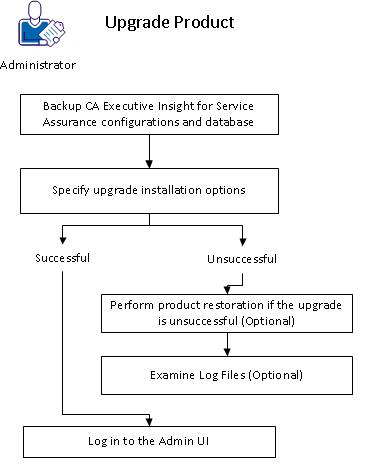
To complete the upgrade installation of CA Executive Insight, follow these steps:
|
Copyright © 2013 CA.
All rights reserved.
|
|