

CA Executive Insight supports business indicators that are mapped to IT metrics. You create business indicators that are based on the available metrics from different data sources in your environment such as CA APM.
A metric connector creates a connection between a data source and the CA Executive Insight application. After the connection is established, the application retrieves IT metrics from the data source and publishes the metric data as business indicators in a dashboard.
Many data sources are supported:
To retrieve data, add a connector and specify the connection information for the instance.
Before you configure metric connectors and build business indicators for your mobile device users, complete the installation of CA Executive Insight.
The following illustration describes how an administrator installs CA Executive Insight on a Linux host.
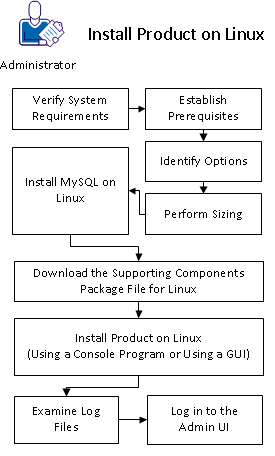
To complete the installation of CA Executive Insight on Linux, follow these steps:
|
Copyright © 2013 CA.
All rights reserved.
|
|