

Autogen Action Option › How to Automatically Generate "Using" Elements with Autogen › Autogen and Autogen Span Processing Examples › Example 3: Autogen Span Systems
Example 3: Autogen Span Systems
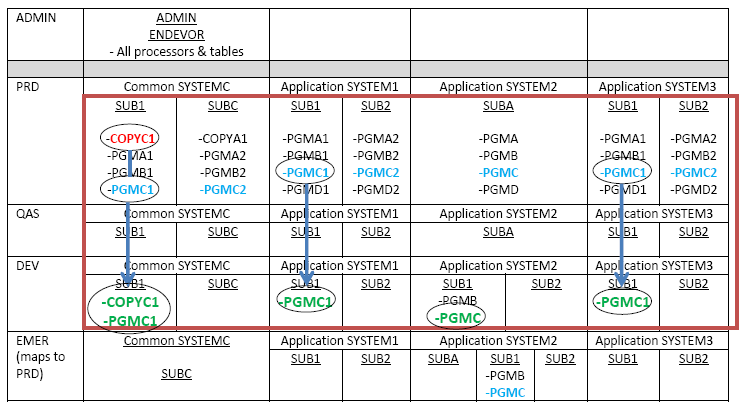
In this example, a developer changes COPYC1 in DEV Common SYSTEMC, Subsystem SUB1, and then wants to automatically generate all using elements that use the copybook in all Systems, but not Subsystems. To do this, the developer performs the following Generate with Autogen Span Systems request:
GENERATE ELEMENT 'COPYC1'
FROM ENVIRONMENT 'DEV'
SYSTEM 'SYSTEMC'
SUBSYSTEM 'SUB1'
TYPE COPYBOOK
STAGE NUMBER 1
OPTIONS CCID REQ#43023
COMMENT 'EDIT COMMON COPY BOOKS'
COPYBACK
AUTOGEN SPAN SYSTEMS .
The effects of this GENERATE request are as follows:
- Copybook COPYC1 is copied back and generated at DEV/SYSTEMC/SUB1/1.
- Element PGMC1, located up the map at PRD/SYSTEMC/SUB1/2 is generated at DEV/SYSTEMC/SUB1/1 as a NOSOURCE element.
- Element PGMC1, located outside the map at PRD/SYSTEM1/SUB1/2 is generated at DEV/SYSTEM1/SUB1/1 as a NOSOURCE element.
- Element PGMC, located outside the map at DEV/SYSTEM2/SUB1/1 is generated in place.
- Element PGMC1, located outside the map at PRD/SYSTEM3/SUB1/2 is generated at DEV/SYSTEM3/SUB1/1 as a NOSOURCE element.
- Element PGMC, located outside the map at EMER/SYSTEM2/SUB1/2 is unaffected, since EMER is not in the environment map of component, COPYC1.
- No other Subsystems except Subsystem SUB1 are affected with an Autogen Span Systems request and thus, using elements in Subsystems SUBA, SUBC, and SUB2 are not generated.
Now the developer can complete his testing, and create a package with Move actions that includes all the effected elements.
After an Autogen Span Systems— The following graphic shows results after a Generate with Autogen Span Systems request is performed on COPYC1 at the target location Environment ‘DEV’, Stage 1, System ‘SYSTEMC’, Subsystem ‘SUB1’.
Copyright © 2014 CA.
All rights reserved.
|
|