

Autogen Action Option › How to Automatically Generate "Using" Elements with Autogen
How to Automatically Generate "Using" Elements with Autogen
As a software developer, you can automatically generate elements that use a component. Such elements are known as using elements. For example, if you have a component element copybook COPYA, then the programs that use that copybook are using elements. To automatically generate using elements, you specify the Autogen action option on the Add, Update, or Generate action that will act on the component element. This option is available in batch only and cannot be used in packages.
The following graphic shows how to automatically generate using elements:
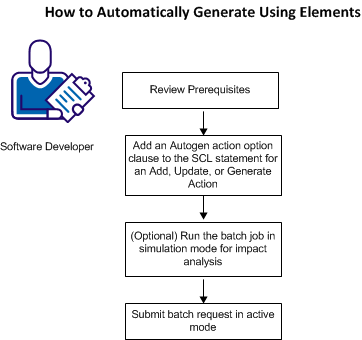
To automatically generate using elements, do the following:
- Review Prerequisites.
- Code an Autogen or an Autogen Span action option in a batch processing request.
- (Optional) Run the Autogen batch job in simulation mode for impact analysis.
- Submit your batch request. For more information about submitting batch jobs, see the User Guide.
Note: Although the Autogen action option can only be used in batch, component elements can be generated in foreground or batch as follows:
- A Generate action generates the target of the action.
- When you add, update, transfer, or restore an element, it is automatically generated. However, the element is not generated if you set the Generate Elements option to N in foreground or specified Bypass Generate Processor in batch. These options tell CA Endevor SCM not to execute the generate processor after adding, updating, transferring or restoring the element.
Copyright © 2014 CA.
All rights reserved.
|
|