

The expert mode allows you to free form the DSCL commands yourself, bypassing the multiple ISPF panel prompting that normally occurs. This allows for much quicker entry of the selection data, but it does require the user to know the language constructs of DSCL. Another useful feature is that previously generated DSCL commands can be recalled and executed from here, without having to re-specify all of the selection criteria. The following illustration is a sample Online Reporting - Expert Mode panel:
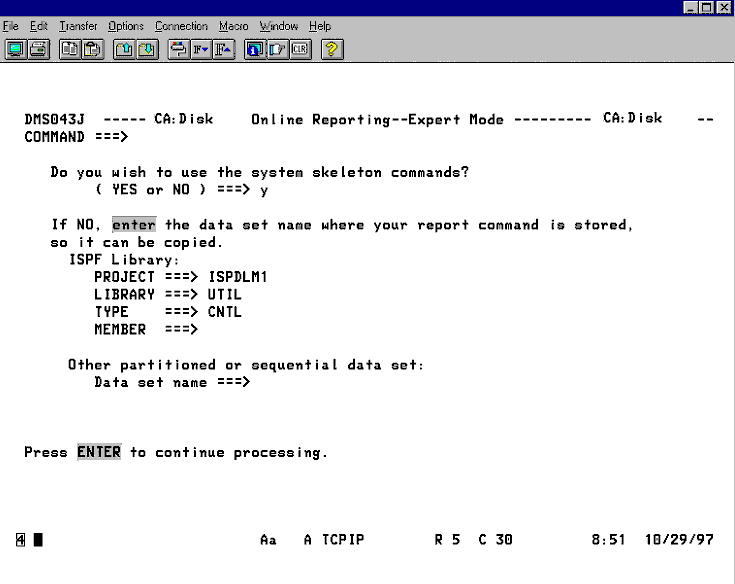
There are two different sources of input for this function. You tell CA Disk which one to use at the prompt DO YOU want TO USE SKELETON COMMANDS? If you answer yes, a basic outline of some DSCL commands will be copied from PARMLIB and you will be taken to edit mode of ISPF so you can modify the commands as desired. This option requires the greater amount of knowledge on the user's part and should only be used if you are knowledgeable about DSCL.
The second option is to answer yes or no to the previous prompt and supply the name of a data set that has DSCL commands already generated. Typically this would be the commands you saved at report disposition time on a previous run. CA Disk will copy these commands to a temporary data set and pass control to ISPF edit so you can modify the commands if you want.
As you can see, either response to the prompt will take you into ISPF edit mode. The only function the prompt served was to tell CA Disk the source of the DSCL command statements. After in edit mode, your screen should look something like this:
|
Copyright © 2015 CA Technologies.
All rights reserved.
|
|