

FMSGEN PROC › Sample Templates › Creating Customized Reports
Creating Customized Reports
Using templates to generate reports is very useful. With FMSSAMP2 as the template see Sample INSTALL Member ? FMSSAMP2, customize the following areas:
- @RPT (TITLE)—Define the report title here. It can be as many lines as desired, and if you want a blank line simply add it to the template. Note that title lines default as center aligned.
- @RPT (HEADER)—Define headings here. Header lines default to left justified.
- @RPT ()—Define the detail lines as needed. For a list of possible detail line values that can be used as symbolic substitutions, see List of Symbolic Substitution Values.
After this is complete, executing FMSGEN will result in output similar to the following illustration which is a Sample output from RPT SECTION of FMSSAMP2.
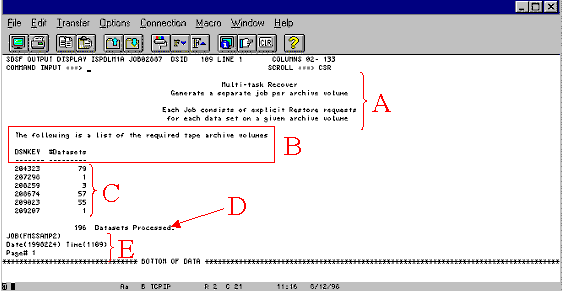
Notes:
- A—Defined in the @RPT (TITLE) statement.
- B—Defined in the @RPT (HEADER) statement.
- C—Created using the %DSNKEY and %COUNT symbols. A complete list of the available symbolic values can be found in
- D—Created using the %COUNT symbol.
- E—Created using the %DATE, %TIME, and %PAGENO symbols. These are calculated fields that are available as symbolic substitutions. Symbolic Substitutions for Templates.
You can use several symbolic substitutions within a template. Using these substitutions make templates more powerful. These symbolics are divided into three categories as follows:
Copyright © 2015 CA Technologies.
All rights reserved.
|
|