

Now edit the properties of the Invoke CA DataMinder Analyze Request task.
To edit the task properties
Invoke CA DataMinder Analyse Request
The Import web service is always installed on the Content Collector host server, so you do not need to change the default connection URL:
http://localhost/ICCImportSvc/import/analyze
Set the Metadata Produced By Service field to:
CA DataMinder Import Metadata Response
These properties define which metadata is sent to the CA DataMinder web service. Set the Class field to:
CA DataMinder Analyze Metadata Request
All the properties that you defined in the user-defined metadata section now appear in the Property column. But the Value column remains blank. You must now populate the Value column with source-property mappings for each task property.
The Edit Expression dialog appears.
For example, for the AttachmentFile property you must map the the File class to FullPath. This gives the following mapping:
<File, FullPath>
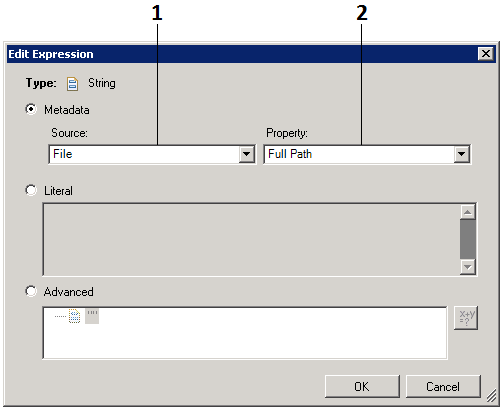
Edit Expression dialog
The complete list of property mappings for the CA DataMinder Analyze Request task are listed below.
Important! A known issue causes the values to disappear in the Property Mappings table. Do not worry about this. The new values have been saved correctly.
Property Mappings for CA DataMinder Analyze Request Task
|
Property |
Value |
Datatype |
|---|---|---|
|
AttachmentFile |
<File, FullPath> |
String |
|
AttachmentName |
<File, FullPath> |
String |
|
BCCRecipients |
<Email,BCCAddress(multi)> |
Multi String |
|
CCRecipients |
<Email,CCAddress(multi)> |
Multi String |
|
DocumentTitle |
<Email,DocumentTitle> |
String |
|
IsAttachment |
<Email,Is Attachment> |
Boolean |
|
IsEncrypted |
<Email, IsEncrypted> |
Boolean |
|
JournalHeaders |
<Email, JournalEnvelopeHeaders> |
String |
|
MessageBody |
<Email, MessageBody> |
String |
|
MessageForm |
<Email, MessageForm> |
String |
|
MessageSize |
<Email, MessageSize> |
Int |
|
OriginatingUser |
<Email, OriginatingUser> |
String |
|
ReceivedDate |
<Email, ReceivedDate> |
Date Time |
|
Recipients |
<Email,RecipientsAddresses(multi)> |
Multi String |
|
SentDate |
<Email,SentDate> |
Date Time |
|
Subject |
<Email,Subject> |
String |
|
ToAddress |
<Email,ToAddress (multi)> |
Multi String |
|
UniqueId |
<Email,UniqueId> |
String |
|
Copyright © 2013 CA.
All rights reserved.
|
|