

When you export the user hierarchy (or a branch of the hierarchy) to a spreadsheet, each spreadsheet row shows a descending sequence of parent groups, starting with the root level group for the current export job and finishing with the user's immediate parent group. For example, if you choose to export the entire user hierarchy, with Users being the root level group:
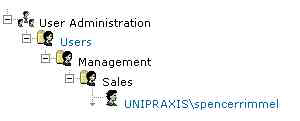
This generates the following record for spencerrimmel in the resulting spreadsheet:

Note: This example assumes that other user details (role, management group and attributes) are not exported.
|
Copyright © 2012 CA.
All rights reserved.
|
|