

A machine policy governs how CA DLP machines operate, communicate with each other, and protect confidential data. The machine policy on the CMS uses some extra settings to control account handling for unknown users or machines and database management.
When you use CA DLP for the first time after installation, you must edit the CMS policy to determine how it handles new machine accounts. It can either create new accounts automatically, or it can require an administrator to manually add new machines in the Administration console.
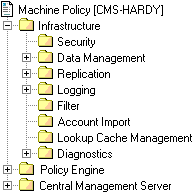
To configure CMS policy
CA DLP creates a new user account automatically. User names for the new accounts are generated automatically based on Microsoft Windows authentication and include a domain prefix, for example, UNIPRAXIS\srimmel.
A new account is not created but the user is permitted to continue using their browser and email application.
A new account is not created and the user is blocked from using their browser and email application.
CA DLP creates a new machine account automatically.
A new account is not created but users on the machine are permitted to continue using their browser and email application.
A new account is not created and users on the machine are blocked from using their browser and email application.
|
Copyright © 2012 CA.
All rights reserved.
|
|