

|
|
|
These diagrams show the front and back of a Bivio 7000 appliance.
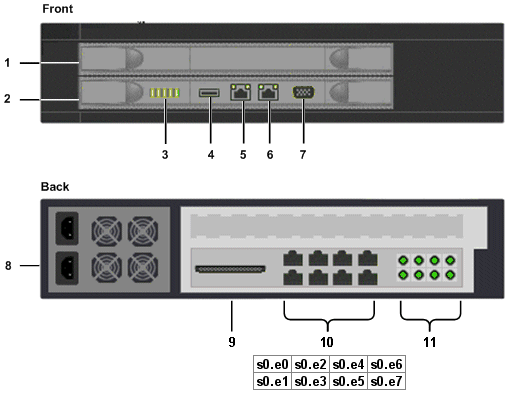
This card hosts additional APC CPUs. It typically occupies the upper slot.
This card hosts the Network Processor, the administration CPU, and four APC CPUs. This card typically occupies the lower slot.
These show the appliance status.
This does not feature in the software installation instructions and is not referred to elsewhere in this guide.
You connect to this Ethernet port to manage NBA operations, when importing captured data onto the CMS, and when connecting to policy engines.
This does not feature in the software installation instructions and is not referred to elsewhere in this guide.
This DB-9 port is used when initializing the NBA.
These are not referred to elsewhere in this guide.
These do not feature in the software installation instructions and are not referred to elsewhere in this guide.
You use these Ethernet ports to capture data on your corporate network.
The ports are arranged in pairs: s0.e0 and s0.e1; s2.e2 and s0.e3; s0.e4 and s0.e5; s0.e6 and s0.e7.
These indicate the state of the hardware bypass. For each port pair:
During normal operations, all the hardware bypass LEDs are on.
Hardware Checklist
You must also do the following:
Find this on a silver sticker in the centre of the rear panel.
Bits Per Second: 115200
Data Bits: 8
Stop Bits: 1
Parity: None
Flow Control: None
| Copyright © 2011 CA. All rights reserved. | Email CA Technologies about this topic |