

|
|
|
Of the back ports, you use the s0.e0 Ethernet port (8) to receive replicated data packets from a network switch. In passive mode, you do not use any other back ports; in active mode, you also use the s0.e1 port to forward processed packets back to the network switch.
These diagrams show the front and back of a Bivio 2000 appliance.
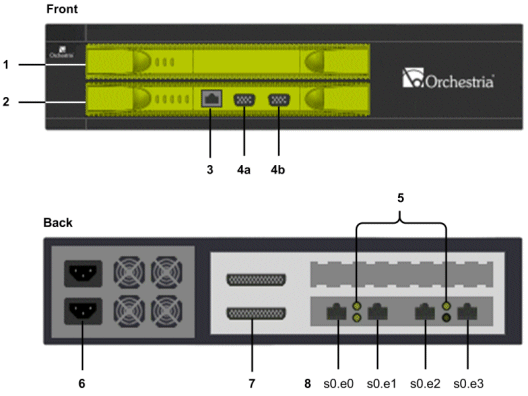
You connect to this Ethernet port to manage NBA operations and when importing captured data onto the CMS.
These DB9 ports are used when initializing the NBA.
You use these Ethernet ports to capture data on your corporate network.
Use this port in both active mode and passive mode. Connect this port to your corporate network or, in passive mode, to a mirroring port on a network switch.
s0.e1
You must use this port in active mode. Connect this port to the internet.
You can also use this port in passive mode where it links directly with port s0.e0.
s0.e2
This port is the policy engine interface, connecting the NBA to the server hosting CA DLP policy engines or a PE hub. If necessary, this connection can use the same switch as port s0.e0.
s0.e3
This port is not used by the NBA.
For all other items, see Hardware Configuration.
| Copyright © 2011 CA. All rights reserved. | Email CA Technologies about this topic |