

|
|
|
The ZDSadapter key contains registry values that control logging operations for the Digital Safe Adapter. Registry values in the WebService subkey are described in the following section.
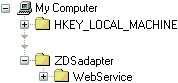
Within the ZDSadapter subkey, configure the following registry settings:
Type: REG_SZ
Data: Defaults to empty.
Log entries are written to a ZDSIngestion_<date>.log or ZDSRetrieval_<date>.log file. This registry value specifies which folder these log files are written to.
If no path is defined, the log file is saved to \System\Data\Log in the CA DLP installation folder on the server hosting the Digital Safe adapter.
Note also that the Universal Adapter service runs as a domain user; this user must have write access to the specified log folder. See the Universal Adapter guide for details about this domain user; contact CA Technical Support.
Type: REG_SZ
Data: Defaults to 1,000,000. This specifies the maximum size for each log file. When the current log file reaches its maximum size, the Digital Safe adapter creates a new log file.
Type: REG_DWORD
Data: Defaults to 10. This specifies the maximum number of log files. When the maximum number of log files exists and the maximum size of the latest is reached (see above), the oldest log file is deleted to enable a new one to be created.
Type: REG_DWORD
Data: Defaults to 2. This determines the level of logging for email processing. For example, you can configure the Digital Safe Adapter to log only errors. If this registry value does not exist, no log file created. The supported logging levels are:
1 CA DLP Errors only
2 CA DLP Errors and warnings
3 CA DLP Errors and warnings, plus informational and status messages
Note: Setting LogLevel to 3 will cause the log file to grow extremely rapidly. This level of logging is provided for testing purposes only.
| Copyright © 2011 CA. All rights reserved. | Email CA Technologies about this topic |