

|
|
|
CA DLP can integrate with Autonomy Message Manager. This is an enterprise message archival and management suite of products that enables organizations to manage and archive huge volumes of messages (emails and IM conversations). This section summarizes how to set up CA DLP to integrate with Message Manager.
Note: For full details about Message Manager, please refer to your Message Manager documentation.
Note: For supported versions of Message Manager, see Supported archive versions.
The diagram below shows an example deployment with, for simplicity, a single Mail Processor server for Message Manager. Using the CA DLP External Agent API, Message Manager passes messages to a local CA DLP hub and policy engine. Included with each message is a unique identifier.
The policy engine then processes these messages. If a message causes a policy trigger to activate, a CA DLP event is generated. The unique message identifier, plus any smart tags generated by policy triggers, are saved with the event’s metadata.
The event, including its metadata, is then replicated to the CMS. Note that the actual email or IM content is not saved on the CMS; instead, the event record in the CMS database includes the unique identifier that references the associated message in the archive.
Finally, the Remote Data Manager uses the message identifiers to retrieve the associated emails or IM conversations from the Message Manager archive during subsequent iConsole event searches.
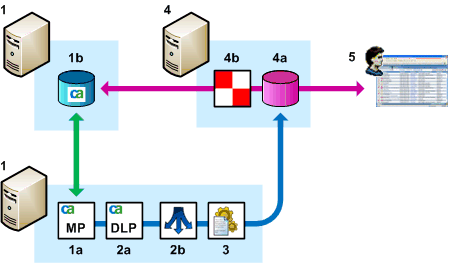
CA DLP integration with Message Manager
| Copyright © 2011 CA. All rights reserved. | Email CA Technologies about this topic |