

|
|
|
Note: Before you can browse the folders on the NBA, see the FTP Folder Connection Requirements.
The FTP folder structure is as as follows:
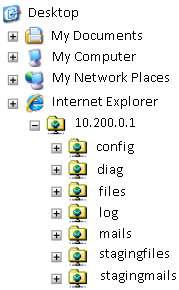
When viewed in Windows Explorer, the NBA contains these folders:
Contains the NBA configuration files:
Contains files of diagnostic data. You generate these by clicking the Diagnostics Collection button in the NBA console. This in turn runs the diag.sh utility.
Each diagnostic file is a zipped file containing various subfolders. These subfolders contain copies of the \config files, log files, and status files for individual NBA components. You can download these diagnostic files to your computer.
Contains files reassembled from data packets analyzed by the NBA.
Contains various NBA log files. Separate log files are maintained for each CPU.
The \err and \out subfolders contain log information created by NBA services at startup. These logs may be useful for troubleshooting and are packaged into diagnostic files when these are created.
Contains EML emails reassembled from data packets analyzed by the NBA.
A temporary storage area, used while the NBA assembles files from their constituent parts distributed across multiple data packets.
A temporary storage area, used while the NBA assembles emails from their constituent parts distributed across multiple data packets.
| Copyright © 2011 CA. All rights reserved. | Email CA Technologies about this topic |