Previous Topic: Web Services Example Using Large Duration TimeNext Topic: Problematic Transaction for Unit of Work


CTG Example for High Suspend Time

This example shows how to analyze a high suspend time using the Trace and Tree Views.

The filter criteria that was used for this example was an event duration of 78. The results for this selected criteria follow.

Follow these steps:
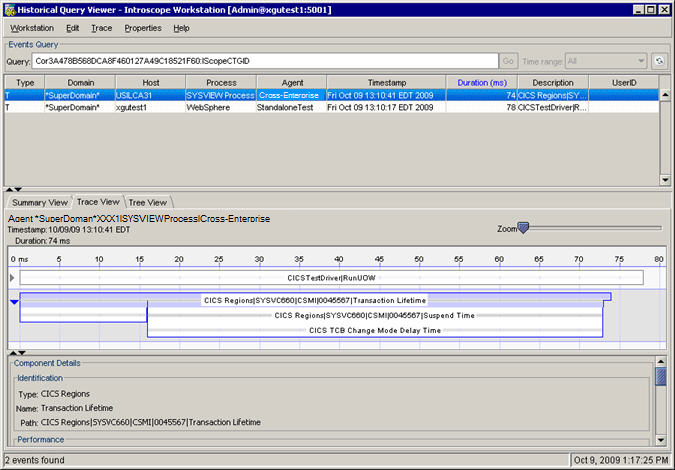
  1. Highlight the transaction with the high duration time.
  2. Click the Trace View.
  3. The Trace View opens displaying the correlated front end and back-end traces.

    CTG Example for High Suspend Time

  4. Select the Tree View tab to diagnose the problem and highlight the transaction trace component to see the properties associated with it.

    The following example shows that the CICS transaction spends 77 percent of its time suspended. The dispatch time is longer than the run time. Correct this issue.
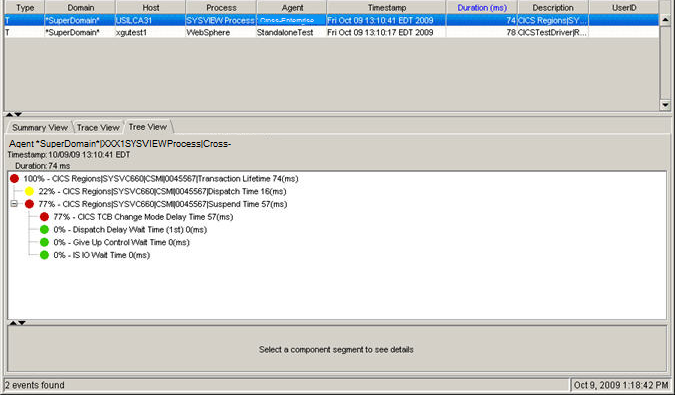
    CTG Example for HIgh Suspend Time Part 2