

Do the following on the host system for each 8500/8700/8800 system that you will be monitoring:
Note: The following steps are valid only for the VAXconsole PRO380 Console V9.3 software.
# cm -c node-name
where node-name is the name of the serviced system. Any keystrokes entered are forwarded to the VAXconsole PRO380 system.
>>> SET TERMINAL OPA0
>>> SET TERMINAL PROGRAM
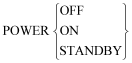
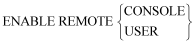
Now all of the console functions to control the VAX 8500/8700/8800 series system from a Console Manager software user interface can be performed with the exception of the following commands, (however, you can enter these commands from the VAXconsole PRO380 terminal keyboard):
|
Copyright © 2010 CA.
All rights reserved.
|
|