

|
|
|
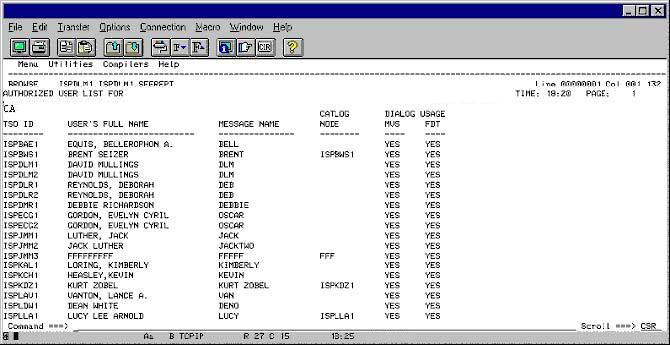
To display or print the list of CA Compress users
|
Field Names |
Contents |
|---|---|
|
TSO ID |
This is the TSO ID of the user. Since the CA Compress Interactive User Interface (IUI) is an ISPF dialog, it uses the TSO ID as the primary user identifier. |
|
USER'S FULL NAME |
This is your full name as recorded in the User Access list of the CA Compress IUI. |
|
MESSAGE NAME |
This is the name you want to appear in the various help and tutorial messages and panels in the field where your name is displayed. |
|
CATALOG NODE |
This field shows what to use for the high-level element in any data set the IUI creates. If it is blank, the default is the Company catalog node. If that field is also blank, your TSO prefix is used. |
|
DIALOG USAGE |
These fields show the CA Compress Dialog services you are permitted to use: |
| Copyright © 2012 CA. All rights reserved. |
|