

|
|
|
To browse a PS data set name in the Control File List
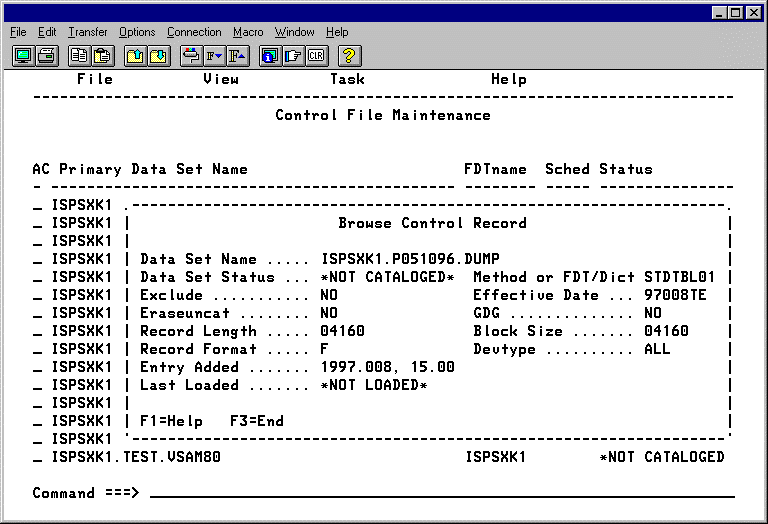
|
Field Names |
Contents |
|---|---|
|
Data Set Name |
(display only) |
|
Data Set Status |
(display only) |
|
Method or FDT/Dict |
This parameter specifies the type of compression you want for the data set. Note: Do NOT change this value if the data set already has been compressed. |
|
Exclude |
This parameter provides a means to temporarily remove compression for a data set without deleting the data set from the Control File. When EXCLUDE is set to YES CA Compress ignores the data set when it is opened and continues to do so until this parameter is set to NO. Important! Only use this parameter when you want the data set to be processed in its compressed form and it is not possible to use the LABEL=EXPDT=86060 JCL parameter for the job that needs to access the compressed data. The danger is that uncompressed data can be written to the data set while compression is turned off, and this condition can make it difficult for you to access the data set later. |
|
Effective Date |
This parameter specifies the Julian date that compression is to be implemented on the data set. When the date becomes current or past, the data set will be compressed the next time it is created or replaced. A value of ANYDATE specifies that the data set should be considered compressed already. If it is opened for output, compressed data is written, and if it is read, each record is expanded. Specify ANYDATE when you are implementing a data set already compressed in an earlier version of CA Compress using the SUBSYS JCL parameter; otherwise CA Compress assumes that the data is still uncompressed until the data set is recreated, and applications receive compressed data. |
|
Erase/uncat |
Specifies whether the entry should be purged from the Control File when the data set is uncataloged. This is an optional parameter and interacts with the GDG parameter. |
|
GDG |
Specifies whether pattern matches should be recognized for all data sets including GDGs (GDG=YES), excluding GDGs (GDG=NO), or only for GDGs (GDG=ONLY). The default is GDG=YES. |
|
Devtype |
Specifies whether compression is to be implemented for Direct Access only (DA), Tape only (TAPE), or any device type (ALL). The default is ALL. |
| Copyright © 2012 CA. All rights reserved. |
|