

|
|
|
To browse a VSAM data set name in the Control File List
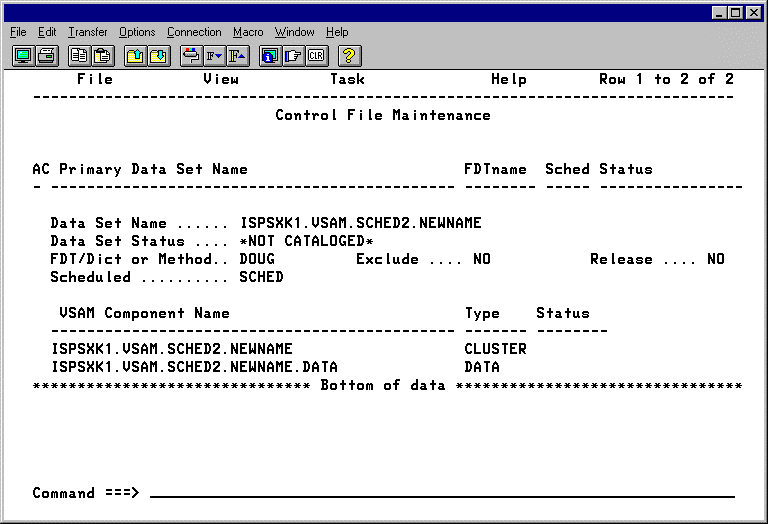
The following table describes the field names and contents of the data set name panel:
|
Field Names |
Contents |
|---|---|
|
Data Set Name |
(display only) |
|
Data Set Status |
(display only) |
|
FDT/Dict or Method |
This parameter specifies the type of compression wanted for the data set. Note: Do NOT change this value if the data set is already compressed. |
|
Exclude |
This parameter provides a means to temporarily remove compression for a data set without deleting the data set from the Control File. When EXCLUDE is set to YES, CA Compress ignores the data set when it is opened and continues to do so until this parameter is set to NO. Only use this parameter when you want the data set to be processed in its compressed form and it is not possible to use the LABEL=EXPDT=86060 JCL parameter for the job that needs to access the compressed data. The danger is that uncompressed data can be written to the data set while compression is turned off, and this condition can make it access the data set later. |
|
Release |
This parameter specifies the percentage that the VSAM SPACE RELEASE feature uses to compute the amount of free space to retain when invoked. This percentage is used only when the data set is loaded with data (that is, when the data set is empty and data is written to it). If you enter the word NO for this parameter, any previously specified value is removed, and no attempt is made to release space on the data set. If you enter a value of 0 for this parameter, the utility interprets it as the default value (10%). You must use the word NO to turn off the release function. |
|
Scheduled |
Defines timing of the data set's compression. The Scheduled parameter can have one of four values: LOAD—CA Compress does not compress the data set until it is RELOADED (that is, when the data set is deleted and reallocated and records are written into it from the beginning). When the data set is reloaded, the entire file is then compressed. OPEN—CA Compress starts compressing and expanding records the next time the data set is opened for output. OPEN slows the growth rate of the data set without requiring an unload/reload. SCHED—The data set is already compressed using a scheduled parameter. CA Compress starts compressing and expanding the records the next time the data set is opened. blank—The data set is not compressed using the scheduled option. |
|
AC |
The data set association line commands can be entered in this field |
|
VSAM Component Name |
The name of the component |
|
Type |
The component type |
|
Status |
Status of the last action performed |
| Copyright © 2012 CA. All rights reserved. |
|