

|
|
|
The following implementation scenario describes how CAISDI delivers an open and flexible method for enterprise-wide incident management in the banking industry. Banking was selected for this example as it uses a heterogeneous IT environment that has strict service level availability requirements and well defined problem escalation procedures.
The fictitious United Banana Growers Bank of the Bahamas (UBGBB) will be used in this example. The UBGBB runs several IBM z/OS mainframe systems that run IMS, CICS, and DB2 to drive their core banking application such as Auto Teller Machine transactions and Bank Branch Customer processing. Their communications network is predominantly TCP/IP based and they run a plethora of 'WinTel' servers that are located both within the Central IT operation glasshouse and across the Wide Area Network in remote Bank Branches.
The UBGBB uses CA mainframe management products to help guarantee the mainframe application, systems, and network service reliability. Additionally they use various CA NSM products to manage their distributed servers, network and other devices. They have standardized on CA Service Desk to manage all exceptions impacts in their IT environment.
The CA NetMaster Network Management products, proactively monitoring for failures in any of the bank branch network nodes, determines that a Nassau bank branch ATM has stopped communicating with IMS on the mainframe. When CA NetMaster Network Management identifies that the Nassau branch ATM node is no longer contactable, the node is flagged as failed and an alert is generated in the CA NetMaster Alert Monitor to warn the mainframe operations team of the problem. The CA NetMaster Alert Monitor has been configured so that the alert notification process for this specific alert automatically and simultaneously opens a priority 1 request record in CA Service Desk. The opened request contains the details of the resource name and the time the network node failed, and provides a summary of the identified failure.
This priority 1 request record appears in CA Service Desk and, based on the resource name and location, it is automatically assigned or escalated to the local Nassau ATM server failure response team. CA Service Desk also returns the assigned request number to CA NetMaster Network Management, where it is added to the alert record to allow correlation between the alert and request record. CA Service Desk also notifies the mainframe operations team that the request has been opened and assigned to the Nassau branch ATM server failure response team. A Service Impact is generated to notify IT management that a service outage has occurred due to an ATM server hardware failure, and that the ATM failure response team is taking the necessary recovery action.
The following graphic illustrates the mainframe-to-CA Service Desk incident lifecycle from creating an alert, to opening a request, to receiving a request number.
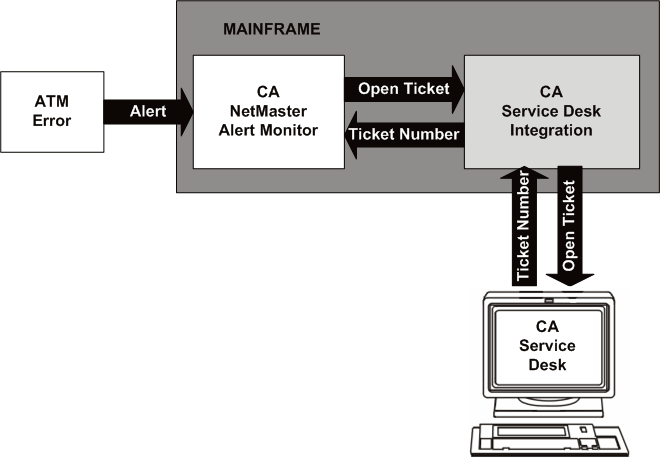
In the scenario, automatic notification and escalation to CA Service Desk occurred before the Nassau bank branch staff noticed the ATM had a problem. This proactive management resulted in significantly reducing the mean time to identify and recover from the failure.
In addition to raising an impact based on a specific alert instance, CA NetMaster Network Management also supports the manual creation of tickets in CA Service Desk. This requires a user to enter the TT command against an alert, which results in a request being opened containing the specific alert details.
You can configure the CA NetMaster Alert Monitor to automatically forward tickets in CA Service Desk based on an alert forwarding filter. This filter defines the alert selection criteria upon which to open a request of a specific type in CA Service Desk. This auto forwarding alert filter contains a Boolean expression that determines which alerts are to be sent by the filter. For example, you could define filter criteria to generate a request for all severity 1 alerts for a specific resource type or matching resource name.
Note: For details on creating CA NetMaster Network Management tickets, see the CA NetMaster Network Management documentation.
| Copyright © 2012 CA. All rights reserved. | Tell Technical Publications how we can improve this information |