

To implement password synchronization, you may need to modify the agent response threshold. The default value is 600 seconds, or 10 minutes. You can modify this threshold by connecting to the Provisioning Server from an LDAP browser such as JXplorer.
Log into the LDAP browser using the following fields on the login screen:
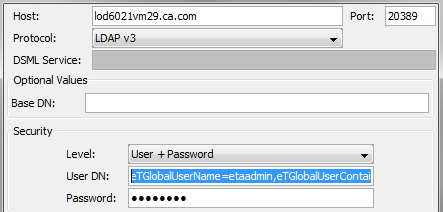
The host name of the Provisioning Server.
20389
Username + password
eTGlobalUserName=etaadmin,eTGlobalUserContainerName=Global Users,eTNamespaceName=CommonObjects,dc=im,dc=eta
The password used for the _impd_etaadmin_pwd in the Provisioning Server installation.
The agent response threshold is the maximum expected duration of each password change that the Provisioning Server sends to a managed endpoint on which a password synchronization agent is installed. This parameter allows the Provisioning Server to recognize when a Password Synchronization agent is processing a password change that is sent to it by the Provisioning Server as distinct from a password change originating on that managed endpoint.
If, during the Agent Response Threshold, a password other than the password just sent to the managed endpoint is provided in a password validation or password change notification, this password is rejected. Two concurrent password changes to the same account are not allowed.
In the LDAP browser, navigate to the following location to set this parameter:
eta, im, Commonobjects, Configuration, Parameters, Password Synchronization, Agent Response Time
|
Copyright © 2013 CA.
All rights reserved.
|
|