

This procedure is for the Identity Management and CA CloudMinder administrator. If CA IAM Connector Server already has the CA LDAP Server certificate, ignore this procedure.
After the mainframe security administrator has confirmed that CA LDAP Server is configured to use SSL, you can import the CA LDAP Server certificate into the CA IAM Connector Server keystore.
Follow these steps:
The Certificates tab lists all of the certificates in the CA IAM Connector Server keystore. To filter the list of certificates by their names, type in the Certificate Filter box.
This procedure is for the CA CloudMinder or Identity Management administrator.
When you connect to an endpoint, the objects on the endpoint are mapped to objects in CA CloudMinder or Identity Management. The mapping happens automatically. If you want to make custom mappings, use Connector Xpress.
For the instructions about setting up custom mapping with Connector Xpress, search for Managing Accounts and Groups in the CA CloudMinder bookshelf or in the Identity Management bookshelf.
To see a list of the objects on the endpoint, download the attribute list from the following page: Download page for Endpoint Guides.
Any LDAP attribute on the mainframe that has a string representation can be exposed as a custom attribute in the connector. To map custom attributes, use Connector Xpress. For information, search for Managing Accounts and Groups in the Identity Management bookshelf or CA CloudMinder bookshelf.
Relationships Between Objects
The following diagram illustrates the relationships between accounts and other objects in CA Top Secret v2:
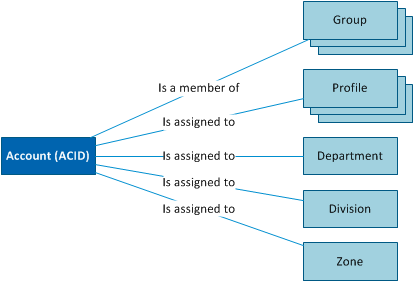
Note: The association between an ACID and a group or profile may have an expiry date.
Only the Groups and Profile attributes are available for use by CA GovernanceMinder. If you set up custom mapping for CA GovernanceMinder, ensure that you use the "Expire Date" attributes only.
|
Copyright © 2013 CA.
All rights reserved.
|
|