

Troubleshooting › Configure SQL Server from Command Prompt 1.1
Configure SQL Server from Command Prompt 1.1
You configure the SQL Server disks manually from the command prompt.
Follow these steps:
- Open a command prompt on the ESX host where the SQL Cluster vApp is deployed.
- Navigate to the directory that holds the VM vmdk files.
- Run the VMKFSTOOLS from ESX Server Service using the following command:
vmkfstools -k OSS-SQL1.vmdk
Note: Use the full path if you are not in the disk directory.
- Repeat the command for the OSS-SQL1_1.vmdk.
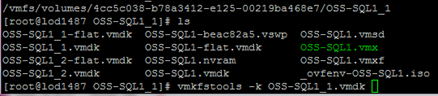
The following confirmation dialog appears:

- Repeat steps 1 through 4 of this procedure for the OSS-SQL2 server disks.
- Run the following commands for OSS-SQL2:
vmkfstools -k OSS-SQL2.vmdk
vmkfstools -k OSS-SQL2_1.vmdk
The SQL Server disks are configured from the command prompt.
Copyright © 2014 CA.
All rights reserved.
|
|