

Installation › How to Deploy Monitoring Service Cartridge › Verify Implementation › Verify CA Spectrum
Verify CA Spectrum
Log in to the virtual machine where the SpectroSERVER is deployed to verify the deployment.
Follow these steps:
- Log in to the virtual machine with administrator credentials.
- Application: MaaS-Spectrum
- User Name: Administrator
- Password:
- Click Start, All Programs, CA, and then start SPECTRUM Control Panel-MaaS-Spectrum.
The CA Spectrum login page opens.
- Log in to the system with administrator credentials.
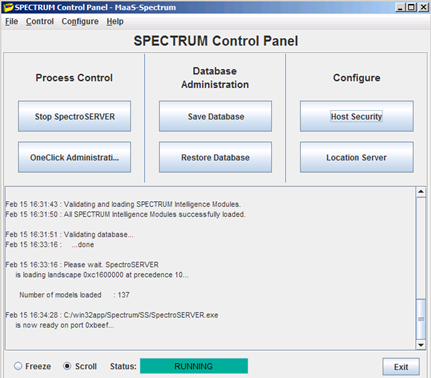
- Ensure the SpectroSERVER status is RUNNING.
If you can log in and access SpectroSERVER, the deployment was successful.
Copyright © 2013 CA.
All rights reserved.
|
|