

Administering Critical Events › Understanding Configuration Manager › How Alert Management Works › Understanding Alert Policies › Message Policy for Alerts
Message Policy for Alerts
Message records for alerts are the same as for any other type of Event Management message. You can define new message records for alerts or use existing ones.
Message actions for alerts, however, are different from actions for other events in the following ways:
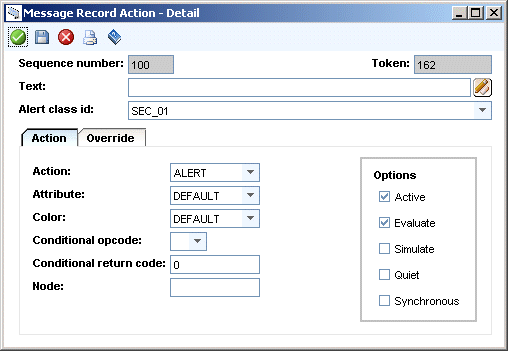
- The Alert class id field ties the message action to AMS.
- The action on the Action page is ALERT.
- An Alert text field becomes available on the Override page. This field is necessary if you want to consolidate alerts. Consolidation groups alerts that have the same alert class, alert queue, node of origin, and alert text. Consolidated alerts appear on the Unicenter MCC as one alert that has a number indicating how many similar alerts are grouped together. You enable consolidation for a class on the Alert Class - Detail, Limits page.
Alert text can be up to 80 characters of text, variables, tokens, or any combination of these. The variables and tokens are the same ones used for Event Management. See Using Variables to Enhance the Current Action. Examples of alert text are:
- “Workstation Agent” or “Eastern Region”
- "&nodeid" to consolidate all alerts for a node. All events for that asset are assigned to the same Service Desk request.
- "Issues for &9 assigned to &10" where the ninth word in the alert message is an office name and the tenth is the person assigned to resolve the critical situation. All alerts for that office and that person are consolidated.
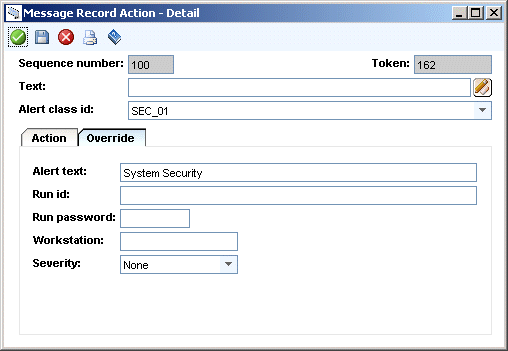
- The Workstation field on the Override page provides a way to run a user action (command) that you defined in Alert Management. Specify the name of an Event Manager node that forwarded the alert. This lets you take corrective actions directly on the node that manages the node where the alert originated. For more information, see User Actions.
The Unicenter MCC shows the manager node in the Route Node column.
Note: Alert Management provides a way to define message records and actions quickly when you define alert classes. For more information, see Define Alert Classes.
Copyright © 2010 CA.
All rights reserved.
|
|