

The security area concept extends the security model. A security area is an optional feature that is suitable for large implementations with thousands of objects managed by different users.
A security area is a geographical, organizational, or topological division. Defining security areas is helpful if you want to restrict the access of users to only the objects linked to their security area. In the security area concept, users, represented by security profiles, and objects are linked to security areas. A security area can be linked to one or more profiles and one or more objects. A user can access an object, if at least one security area linked to the object is also linked to at least one security profile of the user. If object access is denied, the object is not visible for the user.
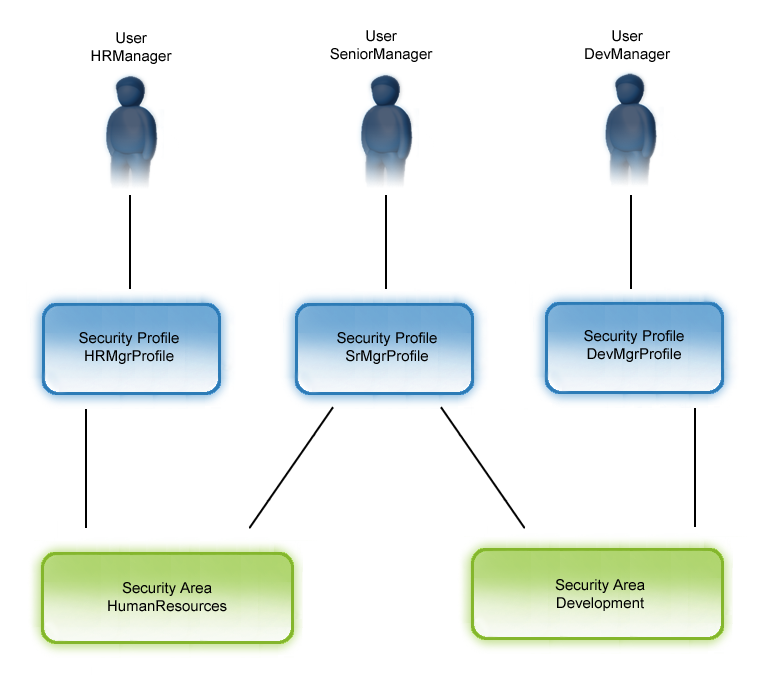
Example: Two security areas and three users
Three users, HRManager, SeniorManager, and DevManager have the user profiles HRMgrProfile, SrMgrProfile, and DevMgrProfile (with all access rights) assigned. Two security areas have been defined, HumanResources and Development. The profiles HRMgrProfile and SrMgrProfile are linked to the security area HumanResources. The profiles SrMgrProfile and DevMgrProfile are linked to the security area Development. Then SeniorManager, represented by SrMgrProfile, has access to both security areas, HumanResources and Development. HRManager has only access rights to security area HumanResources and the user DevManager has only access rights to security area Development. If HRManager, for example, creates a query on his console in the HumanResources area, this is not visible for the user DevManager. Only objects created by the system are visible for all user profiles.
Setting area permissions lets you restrict the access rights on a particular object of one or more profiles. That means that even the class-level permissions defined for a profile are the same. You may assign or link an object to different areas or restrict the access for profiles to see only objects that are linked to a certain area.
In addition to the object permissions, which are basically managed by the security classes, the security subsystem allows to create up to 32 areas.
The following illustration gives you an overview of the area support of the security subsystem.
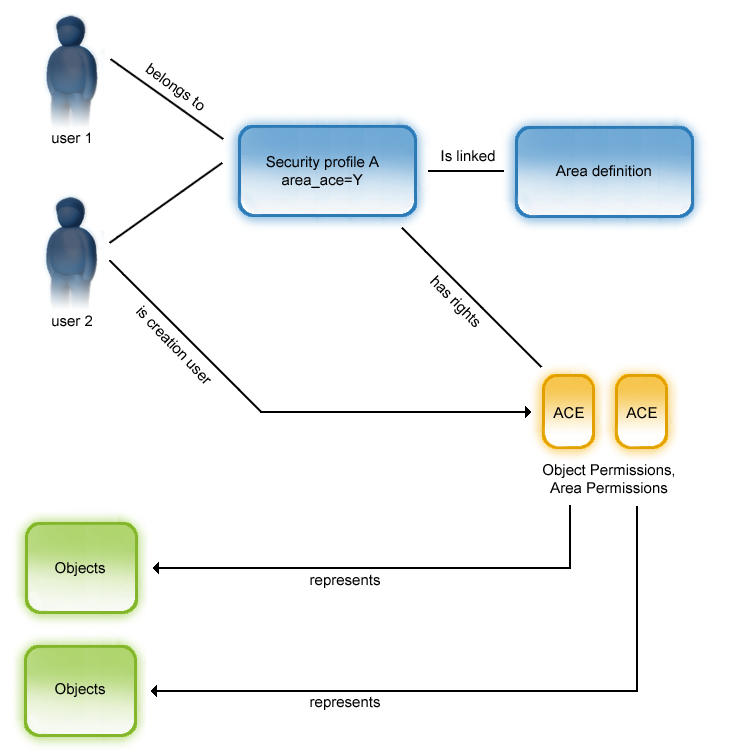
User 1 and user 2 belong to security profile A. In the area definition, which is linked to profile A, it is defined which areas are visible to the users belonging to security profile A.
User 2 created an object, which is visible to all users who are linked to the appropriate area.
For important use cases and the descriptions of what area support is doing in the context of these use cases refer to the section "Security Area Support Use Cases".
|
Copyright © 2014 CA Technologies.
All rights reserved.
|
|