

The DSM Explorer and the Web Console are launched from the CA Service Desk Manager Web GUI through individual URLs.
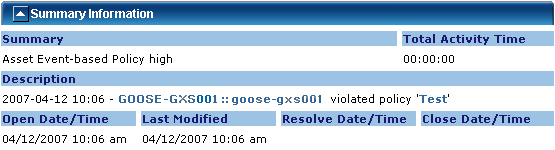
The hyperlink, which launches the DSM Explorer or DSM Web Console, appears in the Description field in the Summary Information of the CA Service Desk Manager ticket:
Note: As the DSM Explorer is started using the dsmgui.exe command, the Explorer needs to be installed on the CA Service Desk Manager machine that is running the CA Service Desk Manager Web GUI.
|
Copyright © 2014 CA Technologies.
All rights reserved.
|
|