

CA Client Automation Integration for MDM collects the asset information from the MDM server and transforms into multiple XML files. Once these files have been processed by CA Client Automation, the assets from the MDM database appear in the CA MDB, as discovered hardware assets alongside the assets found by the native DSM agents. Client Automation treats the collected software inventory as Heuristic Software.
The following diagram illustrates how Client Automation Integration for MDM works:
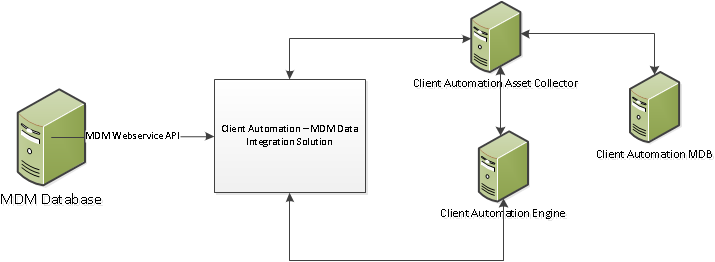
The following are the components involved in Client Automation Integration for MDM:
This is the CA MDM server that contains the MDM asset information to be collected by CA Client Automation.
This is the integration solution that connects to the MDM Server and collects the assets data for transforming into the XML files.
Asset Collector processes the XML files for extracting inventory information and passing it to the Engine.
This is the Client Automation Engine that invokes the Client Automation Integration for MDM solution. The engine also processes the inventory information collected from Asset Collector and inserts into Client Automation MDB.
Includes MDM asset information the alongside the inventory information collected by the native DSM agents.
|
Copyright © 2014 CA Technologies.
All rights reserved.
|
|