

The VersionOne Connector (VersionOne) is a CA Clarity PPM plugin that connects VersionOne with CA Clarity PPM. This integration provides project managers and business users with the following benefits:
By linking your agile projects with VersionOne, you can plan and track all effort, resources, and time as follows:
Example: Manage an agile CA Clarity PPM project with VersionOne
At the Documentation Management company, the product development teams use CA Clarity PPM and a separate agile tool to track their software development projects. As more teams embrace agile methodologies, project management receives limited insight into the team efforts. Visibility is suffering both at the program and portfolio levels. Entering time twice in two different systems is leaving developers frustrated. The difficulty in tracking time accurately on these agile projects is leaving the portfolio leaders frustrated.
The company decides to integrate their CA Clarity PPM projects with VersionOne. Project managers can now manage and track all agile projects as epics in VersionOne. They can create workitems for the epics to break down work at the required level of granularity. They can also track effort against the workitems. The effort is synchronized back to the CA Clarity PPM project WBS and timesheets allowing portfolio managers higher-level visibility.
The following diagram describes how the system administrator and project manager integrate CA Clarity PPM with VersionOne:
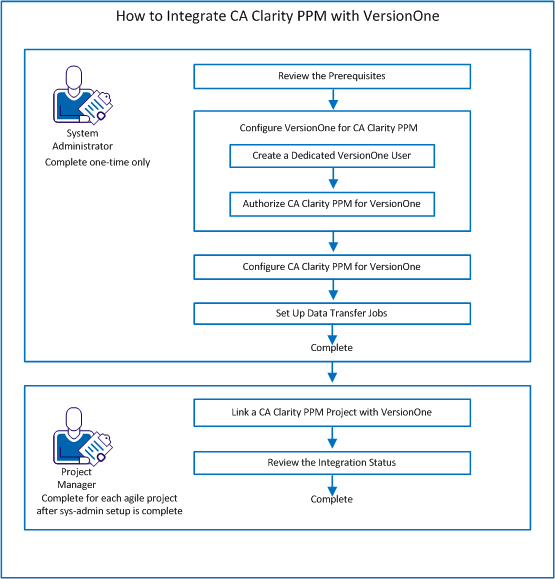
Follow these steps::
|
Copyright © 2015 CA Technologies.
All rights reserved.
|
|