

|
|
|
Samantha is ready to create the Flash variables that map to the global and object parameters in the interactive portlet.
This named Flash variable is mapped to the interactive portlet as the Clarity Session ID in SOAP Header global parameter.
This named Flash variable is mapped to the interactive portlet as the Clarity Web Service URL global parameter.
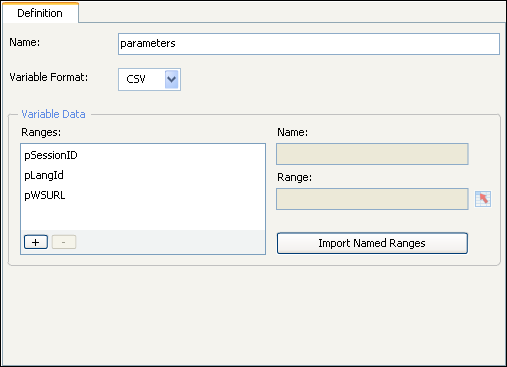
Note: The Flash variable (pLangID) shown in the preceding figure is present in the sample design file but is not covered in this example. The Flash variable has a corresponding global parameter in the sample design file which is also called pLangID. This corresponding global parameter is designed to manage languages. For information about handling this parameter, see the Xcelsius product documentation. You can see one implementation of the parameter by viewing the downloaded sample file in Xcelsius.
Samantha is now ready to test the connection between CA Clarity PPM and Xcelsius by viewing the data.
| Copyright © 2012 CA. All rights reserved. | Tell Technical Publications how we can improve this information |