The Report Definitions page appears listing the report definitions.
The Job Definitions page appears listing the job definitions.
The [Report/Job] Definition: Properties page appears by default.
The [Report/Job] Definition: Parameters page appears listing the report/job definition's parameters.
The Parameter page appears.
- Parameter Label
-
Defines the name of the parameter, which is displayed to users running the report or job.
- Bind Parameter Code
-
Defines the parameter's bind code.
For example, if the job executable type is an SQL stored procedure and the SQL stored procedure parameter name is "P_JOB_RUN_ID", then the bind parameter code is "P_JOB_RUN_ID".
- Type
-
Specifies the parameter field type that is displayed to users when they select parameters to run their report or job.
Values:
- Browse. Select this type when you have a long list of values that users can browse. Users click the Browse icon to select a single value from the lookup (that is, list of values) displayed.
Example:

- Checkbox. Select this type to select boolean values (true/false).
Example:

- Date. Select this type for date parameters. Users who are running reports or jobs can either enter a date or select a date from a calendar.
Example:

- Pull-down. Select this type when you have a list of values that users can select from a drop-down list. Users click the Browse icon to select a single value from the lookup (that is, list of values) displayed.
Example:

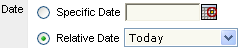
- Relative Date. Use this type to display a field to allow users to select a date relative to the day the report or job is run. The relative dates are presented in a drop-down list of calendar periods. Examples include Start of Current Year, Start of Current Week, and End of Current Year.
Example:
- Text. Use this type to display a text field to users who are running reports or jobs.
Example:

- Time Period. Use this type to display a field from which users can select a time period relative to the day the report or job is run. The drop down provides system-defined periods. Examples include Start of Next Period, Start of Previous Period, and End of Next Period.
Example:

Note: You must save changes to set default values for browse or pull-down parameter types.
- Browse. Select this type when you have a long list of values that users can browse. Users click the Browse icon to select a single value from the lookup (that is, list of values) displayed.
- Lookup Style
-
Indicates a parameter's lookup style. Choose either:
- Single-select. Allows users to select only one value for the lookup.
- Multiple-select. Allows users to select multiple values from a lookup. For example, a user could select multiple managers to appear on a report.
- Browse
-
Identifies the lookup that supplies values for the browse list if Browse type is selected. Click the Browse icon to select a lookup.
- Default
-
Indicates the read only value that is to display in the parameter field if it is defined as display-only.
- Required
-
Specifies whether you want to require users to provide a value for this parameter setting; the criteria to run the report or job.
- Read-only
-
Specifies whether you want to make this parameter display to users running the report or job as display-only.
Note: Read-only parameters must have default values.
The new report/job definition's parameter is defined.