

|
|
|
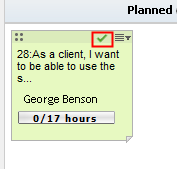
You can mark the story card as Ready to Pull when the tasks associated with its user story or issue are completed. The story cards which are Ready to Pull are indicated with a checkmark on the story card.
For example, the team members complete the tasks associated with the user story “As a General Manager, I want to see all activities on the quotes that are open for my product lines”. The story card for the user story is marked as Ready to Pull.
Follow these steps:
The story card is marked with a checkmark indicating you can pull the card to the next lane.
| Copyright © 2012 CA. All rights reserved. |
|