

As a storage administrator, you oversee the costs of your storage environment and manage DASD (direct access storage devices) costs. CA Chorus for Storage Management lets you efficiently analyze your storage environment and manage the cost of your DASD.
To demonstrate the analytical tools, consider the Current Analyses object. Each row in the object presents an analytical scenario. Some of the Current Analyses object scenarios are:
The questions in this scenario are based upon the current DASD capacity, free space characteristic data, and peak demand targets (DASD free space padding). The DASD free space padding value is expressed as a percentage of the overall capacity of online DASD and represents the desired level of excess capacity needed to handle peak demand, as well as short-term growth in DASD requirements.
The analytical scenarios not only show current DASD costs, but they also show the projected costs for the next two years. The current (first) year cost is calculated as a number of gigabytes of unallocated DASD over the desired free space padding multiplied by the total cost per gigabyte of DASD. The second and third year calculations represent the potential cost savings that might occur if unused idle space is reduced.
The values displayed are calculations based on the values shown in the Customer Site Costs Data object and data provided by the storage engine. The Customer Site Costs Data object is located in the Cost Analysis directory of the Storage object tree.
Note: For more information about changing values shown in the Customer Site Costs Data object, see the CA Chorus Administration Guide.
The following are a few examples of the variables used in the analytical scenarios for this object:
The following is the storage resource data provided by the storage engine:
The following analyses are performed in this scenario:
Note: When the Current Analyses object is displayed in the Investigator, click the (?) help button in the object table toolbar to display the Knowledge Center. Click the link to open the Current Analyses object help. The object help provides a description of the object, and its Actions, Details tabs, and fields (columns).
The following illustration shows how a storage administrator analyzes and manages the cost of DASD:
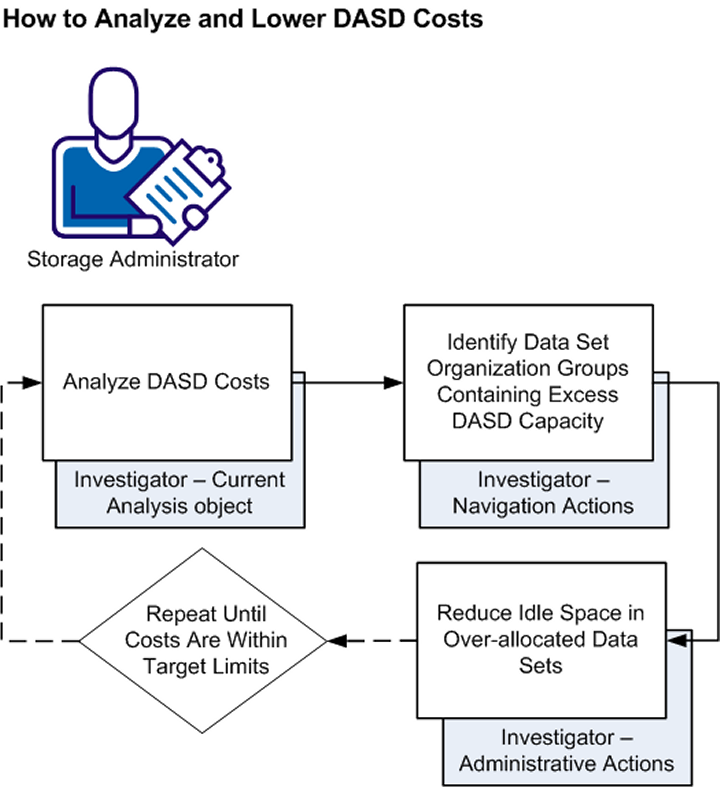
To analyze and manage DASD costs, do the following:
|
Copyright © 2013 CA Technologies.
All rights reserved.
|
|