

CA Business Service Insight is a multi-tier application that you can deploy on any number of servers. Most deployments use the standard 3-tier model, which often includes firewalls between the physical servers for various purposes. Configure the firewalls to allow communication between the CA Business Service Insight components.
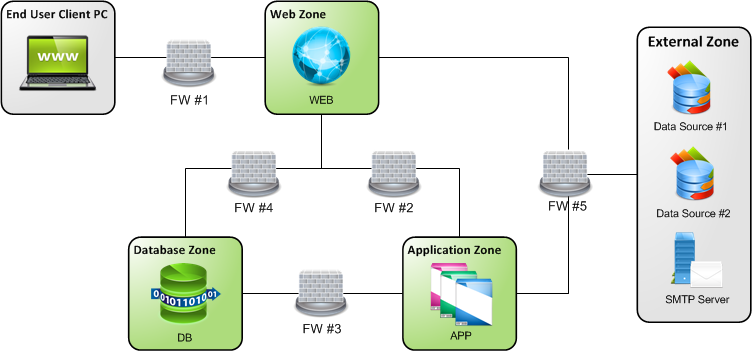
The following table shows the processes and components that communicate between zones:
|
Zone |
Process/Component |
Notes |
|
Web |
IIS Web Server
|
Serves web content to the client browsers, and retrieves data from the Database. |
|
|
|
|
|
COM+ components |
Performs actions on DB, retrieves data, and sends SMTP messages. |
|
|
API
|
Handles incoming web services requests |
|
|
Authentication Service (SSO/LDAP)
|
Handles external authentication requests.
|
|
|
Application |
Adapters Listener Service
|
Handles incoming Adapter connections from Adapter instances. |
|
Adapter Deployment Service |
Deploys and controls the locally deployed managed adapters |
|
|
Log Server |
Logs all incoming messages from BSI COM+ components and Application Services, such as TaskHost and Alerts. |
|
|
Dashboard Service |
Updates the status and results of the dashboard components. |
|
|
PSL Engine |
Calculates all service level results and provides information for other dependant application services, such as Dashboard, Alerts. |
|
|
Report Scheduler Service Alerts Service (SMTP) |
Sends SMTP messages from the Application server. |
|
|
Adapter Instance(s)
|
Connects to the data sources and handles the collection of raw data with the Adapter Listener Service. |
|
|
Database |
Oracle Database
|
Stores and manages all application data. |
|
Database Listener
|
Handles incoming connections to the database. |
|
|
External |
Adapter Instance(s) |
Connects to the data sources and handles the collection of raw data with the Adapter Listener Service. |
|
Adapter Deployment Service |
Deploys and controls the remotely deployed managed adapters. This service should on the same machine as each remotely deployed adapter. |
The following tables lists the ports and protocols for CA Business Service Insight processes and components:
|
PROCESS (SOURCE) |
FW# |
DESTINATION |
PROTOCOL |
DEFAULT PORT(S) |
DIRECTION |
CHANGEABLE? |
|
Web Zone Originating |
||||||
|
IIS Web Server |
#2 |
Log Server (Application Server) |
TCP |
4040 |
Outgoing |
Y |
|
IIS Web Server |
#2 |
Adapter Deployment Service (Application Server) |
TCP |
1008 |
Both |
Y |
|
IIS Web Server |
#2 |
Dashboard Service (Application Server) |
.Net Remoting |
8004 |
Both |
Y |
|
IIS Web Server |
#5 |
Authentication Service/Server (External) |
SOAP/HTTP |
4515 |
Both |
Y |
|
IIS Web Server Email |
#5 |
SMTP Server (External) |
SMTP |
25 |
Outgoing |
N |
|
COM+ components |
#4 |
Database Server |
TCP (SQL *Net) |
1521 |
Both |
Y |
|
Application Zone Originating |
||||||
|
Report Scheduler & Alerts Services |
#5 |
SMTP Server (External) |
SMTP |
25 |
Outgoing |
N |
|
All Guarantee Services (Alert, Dashboard etc) |
#3 |
Database Server |
TCP (SQL *Net) |
1521 |
Both |
Y |
|
Adapters (locally hosted) |
#5 |
External Data Sources |
TCP /File |
App Defined** |
Both |
Y |
|
Adapters (remotely hosted) |
#5 |
External Data Sources |
TCP |
User Defined** |
Both |
Y |
|
Adapter Listener |
#5 |
Remote Adapter Instance |
TCP |
User Defined** |
Both |
Y |
|
External Zone Originating |
||||||
|
Client PC (External) |
#1 |
IIS (Web Server) |
HTTP (or HTTPS) |
80 (443) |
Both |
Y |
|
Adapter Instance (remotely hosted) |
#5 |
Adapter Listener (Application Server) |
TCP |
User Defined** |
Both |
Y |
|
External Calling Application/Machine |
#5 |
API Service (Web Server) |
SOAP/HTTP |
80 |
Both |
Y |
|
Other |
||||||
|
MSMQ (Microsoft Messaging Queuing) |
|
|
TCP |
1801 |
|
|
|
|
|
RDP |
135, 2101/2112, 2103/2114, 2105/2116 |
|
|
|
|
|
|
UDP |
3527, 1801 |
|
|
|
|
ACE II (Aggregation and Correlation Engine) |
|
|
|
4073, 1298, 1299, 8283, 4744, 4645, 3728, 19201, 1361, 1363, 8293, 8280, 1300, 5546, 4657 |
|
|
|
ACE II content transfer
|
|
|
|
3973, 1198, 1199, 8183, 4544, 4545, 1200, 1201, 4548, 3628, 19101, 1261, 1262, 8193, 8180, 5546, 4557 |
|
|
|
Tomcat |
|
|
|
8007 standard port |
|
|
|
SOI/SSA (Web Server with Tomcat) |
|
SOI Server |
TCP |
7090 |
|
|
|
Oblisync |
|
CA Business Service Insight Installation |
TCP |
8180 |
|
|
** Adapters must connect to external applications based on the requirements of the related data source, SQL or file-based access.
++ Adapters communicate according to ports defined in CA Business Service Insight. By default, the Adapter wizard automatically assigns ports starting upward from 6201. Configure the communication to initial from either the Adapter Instance or the Adapter Listener (Adapter->Listener, or Listener->Adapter). The ports may be important for Firewall configurations that use the Port Triggering feature.
The following table shows optional ports and communications that provide access for development and support, and enable the transfer of source data files:
|
PROCESS (SOURCE) |
FW# |
DESTINATION |
PROTOCOL |
DEFAULT PORT(S) |
DIRECTION |
CHANGEABLE? |
|
External Zone Originating |
||||||
|
Client PC (External) – Remote Desktop |
#1 |
Web Server and Application Server
|
RDP |
3389 |
Both |
Y |
|
Client PC (External) – File System / Sharing++ |
#1 |
Web Server and Application Server
|
Netbios/Samba over IP |
137, 138, 139, 445 |
Both |
Y |
|
Client PC (External) – FTP / SFTP** |
#1 |
Web Server and Application Server
|
FTP/SFTP |
21/22 |
Both |
Y |
** FTP and SFTP require the installation of separate application software that CA Business Service Insight does not include. SFTP commonly runs over SSH on port 22.
++ These ports enable file system access to the machines and must only be exposed to trusted areas, as they open potential security holes.
|
Copyright © 2014 CA.
All rights reserved.
|
|