

As a system administrator, you are responsible for preparing a database for CA Business Service Insight. This scenario describes a standard Oracle server configuration. For specific configurations, such as RAC, this scenario provides an example. For more information, see the Oracle documentation or contact Oracle for assistance.
Use this procedure to guide you through the process:
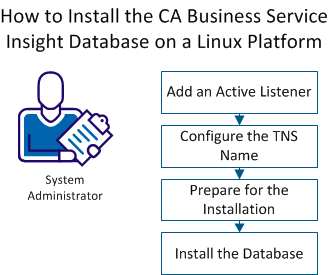
If there is not active listener, create and configure a listener.
Follow these steps:
The active listener is created.
To enable the creation of the CA Business Service Insight database, configure the local Net Service Name.
Follow these steps:
TNSname.ora is created under /opt/oracle/product/11.2/DB_1/network/admin.
TNSping Oblicore
The following example shows the expected return:
TNS Ping Utility for Linux: Version 11.2.0.1.0 - Production on 21 - AUG - 2013 15:31:07

Copyright (c) 1997, 2009, Oracle. All rights reserved.

Used parameter files:
/opt/oracle/product/11.2/DB_1/network/admin/sqlnet.ora


Used TNSNAMES adapter to resolve the alias
Attempting to contact (SESCRIPTION = (ADDRESS = (Protocol = TCP) (HOST = 6201 - lab350- sp) (PORT = 1521))) (CONNECT_DATA = (SERVICE_NAME = oblicore)))
OK (10 msec)
oracle@6201 - LAB350- SP:/Download/Setup/InstallDB>
To prepare the directory for installation, perform the following tasks.
Follow these steps:
Mkdir -p /Software/SetupDB/InstallDB/Log
Chown -R oracle:oinstall /Software/SetupDB
#!/bin/bash
dos2unix_recursive()
{
for file in "$1"/*; do
   if [ ! -d "$file" ] ; then
     if [ ! -L "$file" ] ; then
       echo Convert $file to Unix format...
       dos2unix $file $file
     fi
   else
     if [ ! -L "$file" ] ; then
       dos2unix_recursive $file
     fi
   fi
done
}

dos2unix_recursive "$PWD"
chmod -R +rx *.sh
Example:
[DataBaseDetailes]
OBLICORE_ROOT=/oracle/Oblicore
DB_NAME=oblicore
ORACLE_HOME=/opt/oracle/product/11.2/DB_1
ORACLE_VERSION =11
DB_SIZE= large
SYS_PASS=sys
OBLICORE_USER=oblicore
OBLICORE_PASS=oblicore
OBLIDBADMIN_PASS=oblidbadmin
DB_CHARSET=utf8
DB_SYNONYM=public
To provide a database for CA Business Service Insight, install the database.
Follow these steps:
sh Main.sh
The Command Line Terminal opens.
The creation of the TNSNAME and the Database oblicore begins. This process may take more than 10 minutes.
The database is ready for use.
|
Copyright © 2014 CA.
All rights reserved.
|
|