

|
|
|
The development framework provides several tools to facilitate the process of integration scripts development:
CA Business Service Insight integrated editor from development of scripts. For more information, refer to the current CA Business Service Insight User Guide.
User interface for defining the filter of the translation entries on which the script will work. The following entry filtering criteria are available:
Built-in tool to test the developed script. When testing the script in the script scope, no operation used by the formal open interface is made in the database. For more information, refer to the current CA Business Service Insight User Guide.
Using the user interface, the user can either run the script or schedule it. The following alternatives are available:
In the first three cases above, the script runs only on entries defined in the filter. In the last case, the script runs only on the selected entries.
The user can define the order between the various scripts when happen to run in the same time.
The script is run under a run-time environment that provides a shell to the developed script. In addition, a library of methods and objects assisting the script author when creating the script is provided out-of-the-box.
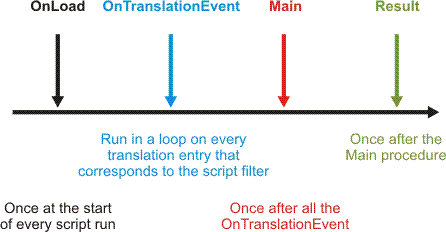
The script run time contains several procedures and functions that act as event handlers triggered to be executed on a fixed order. These event handlers are optional and the script author may use only a portion of them.
Procedures and functions include:
Note: All dates in the script use the same time zone and date format, according to the defined script time zone. The time zone is defined in the general details of the script.
|
Name |
Description |
|---|---|
|
OnLoad |
Called once when the script starts. It can be used for initialization of global variables. |
|
OnTranslationEvent |
Called for every translation entry that answers to the script filter. It gets one parameter as input parameter: EntryDetails. (This parameter is a TranslationEntry component). |
|
Main |
Called once after the OnLoad and after the OnTranslationEvent functions. It can be used to write code that reads data from external data source and updates the resources, event types, services, and contract parties tables in CA Business Service Insight. |
|
Result() |
Function that is called after the Main procedure. It returns a string that will be inserted to the LastResult field that can be viewed in the translation scripts list page or in the translation script details page. |
In addition to the above, the following objects are provided as part of the framework library:
A class of objects that can be created using the Tools.CreateMap method. This class of objects represents a unique, sorted container that associates a string type key with a value of any type. No two elements in a class Map object may have the same key.
This safe component lets the user connect to any database using ODBC for reading purposes only.
This component represents the translation entry fields. It supplies a Get method for each field in the entry. The TranslationEntry component represents one translation entry. The component supplies only Get methods. The OnTranslationEntry method in the script gets one parameter called EntryDetails, which is a TranslationEntry component.
The object contains all methods that are part of the CA Business Service Insight open interface.
There are two methods managing database transactions that are part of the tools object and require special attention. These methods are Commit and Rollback. The runtime environment manages the opening of a database transaction. Inside the script the user can manage transaction directly. This is to assure that blocks of data are inserted successfully as complete units. The user can either commit or roll back the changes at any point. In case a commit operation is not performed due to an error or if it was not called explicitly, the script is rolled back automatically. It's important to mention that testing the script in the script scope the commit operation is not performed in any circumstances.
For more information, see API Reference List.
Safe and unsafe running modes
A script that is indicated as Safe cannot do any harm to the environment where run, by accessing directly the database or the file system. In addition, it cannot use CA Business Service Insight internal components (CA Business Service Insight COM objects). Safe script can use only safe objects that were defined by CA Business Service Insight in advance. The safe mode is the default mode.
A script can be changed to run in unsafe mode, and can then access databases in write-mode, create and delete files from the file system, and use CA Business Service Insight internal components (CA Business Service Insight COM objects). A script can be changed to unsafe mode only directly in the database, so as to prevent unauthorized users from creating such scripts. See also: LDAP Integration Steps and Translation Scripts-User Function Scripts Examples.
Important Note: CA Business Service Insight COM objects have an XML interface that can change between versions. When using the methods of CA Business Service Insight COM objects, these are handled by their transactions and open other transactions. It is in these subsequent transactions that the commit will be done whenever a method is finished. Updates already committed will not be rolled back if an error occurs in the middle of the script, only the updates in the effected method will be rolled back. Furthermore, the XML interface of the CA Business Service Insight COM object may change and will cause the script to produce run time errors. The use of the unsafe mode is recommended in scripts only for special cases, such as reading from external data sources.
| Copyright © 2012 CA. Tous droits réservés. | Envoyer un courriel à CA Technologies sur cette rubrique |