

Requisiti dell'organizzazione
Utilizzare gli utenti già esistenti definiti nel server LDAP dell'organizzazione. Inoltre, il portale dell'organizzazione è utilizzato per la registrazione e l'accesso a CA Business Service Insight tramite la funzionalità CA Business Service Insight di accesso invisibile all'utente per portali Single Sign-On (SSO).
Definire uno script di conversione Visual Basic (VB) per la creazione automatica di utenti nel sistema CA Business Service Insight (sincronizzazione LDAP); lo script di conversione viene utilizzato per la connessione al server LDAP dell'organizzazione e l'estrapolazione dell'elenco utenti. I metodi del pacchetto di strumenti CA Business Service Insight sono utilizzati per la creazione di utenti, gruppi e ruoli.
Esempio di codice VB di connessione LDAP
Option Explicit On
Imports System.DirectoryServices
    Public Function GetLDAPUsers(ByVal ldapServerName As String, ByVal pFindWhat As String) As ArrayList
        Dim oSearcher As New DirectorySearcher
        Dim oResults As SearchResultCollection
        Dim oResult As SearchResult
        Dim RetArray As New ArrayList
        Dim mCount As Integer
        Dim mIdx As Integer
        Dim mLDAPRecord As String
        Dim ResultFields() As String = {"securityEquals", "cn"}
        Try
            With oSearcher
                .SearchRoot = New DirectoryEntry("LDAP://" & ldapServerName & _
          "/dc=lippogeneral,dc=com")
                .PropertiesToLoad.AddRange(ResultFields)
                .Filter = "cn=" & pFindWhat & "*"
                oResults = .FindAll()
            End With
            mCount = oResults.Count
            If mCount > 0 Then
                For Each oResult In oResults
                    mLDAPRecord = oResult.GetDirectoryEntry().Properties("cn").Value & "  " & oResult.GetDirectoryEntry().Properties("mail").Value
                    RetArray.Add(mLDAPRecord)
                Avanti
            End If
        Catch e As Exception
            MsgBox("Error is " & e.Message)
            Return RetArray
        End Try

        Return RetArray
    End Function

Sub CheckAddUser
Dim map
Set map = Tools.GetUserDetails("acme@Test")
'Controllare se l'utente esiste già
'mappa Tools.AddUserByMap
'Controllare duplicati
map("UserName") = "acme2"
map("UserPassword") = "acme2"
map("UserPasswordExpirationInterval") = "50"
map("UserDescription") = "New description"
map("UserStatus") = "INACTIVE"
Tools.AddUserByMap map
Tools.Commit
End Sub
Metodi dello script di conversione VB CA Business Service Insight
AddOrganization / IsOrganizationExists
IsRoleExists / SearchRoles
AddUserByMap / GetUserName
GetOrganizationName / IsUserExists
GetUserDetails / SearchUsers
GetUserFullName / UpdateUserByMap
AddUserGroupByMap / IsUserGroupExists
DeleteUserGroup / SearchUserGroups
GetUserGroupDetails / UpdateUserGroupByMap
Creare un codice di accesso invisibile all'utente e integrarlo nel portale dell'organizzazione per l'accesso a CA Business Service Insight.
Esempio di codice C# del gateway CA Business Service Insight (viene integrato nel portale dell'organizzazione)
using System;
using System.Data;
using System.Configuration;
using System.Collections;
using System.ComponentModel;
using System.Drawing;
using System.Web;
using System.Web.Security;
using System.Web.SessionState;
using System.Web.UI;
using System.Web.UI.WebControls;
using System.Web.UI.WebControls.WebParts;
using System.Web.UI.HtmlControls;
using System.Security.Cryptography.X509Certificates;
using OblicoreAuthenticationWebService;

namespace Oblicore.SSO
{
      /// <summary>
      /// This sample page is a sample gateway to Oblicore Guarantee(tm) application interface
      /// The page should be called prior navigating to any page at Oblicore Guarantee website
      /// or any page using Web Services supplied by Oblicore
      /// The OblicoreGateway page should perform the following actions:
      ///         1) Call Oblicore Authentication Web service in order to authenticate current user
      ///         2) Call SilentLogin.asp page at Oblicore website to login silently at Oblicore website
      ///            and create user session context
      ///         3) Redirect to desired page
      /// </summary>
      public partial class _Default : System.Web.UI.Page
      {

            /// <summary>
            /// Oblicore user credentials
            /// </summary>
            struct UserCredentials
            {
                  public string UserName;
                  public string Organization;
            }

            private void Page_Load(object sender, System.EventArgs e)
            {

                  if (Request["OGSESSIONID"]!=null)
                  {
                        //We have been redirected back to this page from SilentLogin.asp after authentication.
                        //Save OGSESSIONID in cookie for further use
                        HttpCookie SessionCookie = new HttpCookie("OGSESSIONID",Request["OGSESSIONID"]);
                        Response.Cookies.Add(SessionCookie);
                        //Redirect to desired page
                        Response.Redirect("/");
                  }
                  else
                  {
                        //First time we enter the page.
                        //Let's perform authentication.

                        string sAuthToken = string.Empty;

                        // Obtain OG user name and organizations from portal user directory
                        UserCredentials ucOblicoreUser = GetOblicoreUserCredentials();

                        //Initialize Oblicore Authentication WebServce
                        //Project should include Web Reference to the service
                        //Service is located on Oblicore Guarantee website at /WebServices/OblicoreAuth.asmx
                        OblicoreAuth oAuthService = new OblicoreAuth();
                     //     oAuthService.ClientCertificates.Add(x509);
                        oAuthService.Url = "https://" + "localhost" + "/WebServices/OblicoreAuth.asmx";
                        try
                        {
                              //Invoke authentication Web Service.
                              //The AuthenticateUser method returns encrupted token, which should be passed to
                              //SilentLogin.asp page, located in root folder of Oblicore Guarantee website
                              sAuthToken = oAuthService.AuthenticateUser(ucOblicoreUser.UserName,ucOblicoreUser.Organization);
                        }
                        catch (Exception ex)
                        {
                              //Proceed authentication error if any
                              Response.Write("The error has occurs during Oblicore authentication: " + ex.Message);
                              Response.End() ;
                        }

                        //Call SilentLogin.asp page along with passing it authentication folder
                        //SilentLogin.asp page is located Oblicore Guarantee website root folder
                        //After logging in, SilentLogin.asp page will redirect us back to the current page along with passing OGSESSIONID parameter
                        //Response.Redirect(ConfigurationSettings.AppSettings["OGURL"].ToString() + "/SilentLogin.asp?AuthToken="+Server.UrlEncode(sAuthToken)+"&DesiredPage="+GetCurrentPageURL());
                        Response.Redirect("https://vit-05/SilentLogin.asp?AuthToken=" + Server.UrlEncode(sAuthToken) + "&DesiredPage=/Oblicore.asp"); // + GetCurrentPageURL());
                  }
            }


            /// <summary>
            /// Obtain Oblicore Guarantee user name and organization from portal user directory
            /// The method is supposed to call ActiveDirectory or another repository using portal API
            /// to obtain current user name and organization in terms of Oblicore Guarantee
            /// </summary>
            /// <returns>Oblicore Guarantee user credentials struct</returns>
            private UserCredentials GetOblicoreUserCredentials()
            {
                  UserCredentials ucOblicoreUser = new UserCredentials();
                  //currently alwasy assume user is sadmin and organization is Oblicore (default)
                  ucOblicoreUser.UserName = "sadmin";
                  ucOblicoreUser.Organization = "Oblicore";
                  return ucOblicoreUser;
            }


            /// <summary>
            /// Retrieves current page URL
            /// </summary>
            /// <returns>Full URL of current page</returns>
            private string GetCurrentPageURL()
            {
                  string s = (Request.ServerVariables["HTTPS"]==null||Request.ServerVariables["HTTPS"].ToLower()=="off")?"http://":"https://";
                  s += Request.ServerVariables["SERVER_NAME"] + Request.ServerVariables["URL"];
                  if (Request.QueryString.ToString() != string.Empty)
                  {
                        s += "?"+Request.QueryString.ToString();
                  }
                  return s;
            }

            #region Web Form Designer generated code
            override protected void OnInit(EventArgs e)
            {
                  //
                  // CODEGEN: This call is required by the ASP.NET Web Form Designer.
                  //
                  InitializeComponent();
                  base.OnInit(e);
            }

            /// <summary>
            /// Required method for Designer support - do not modify
            /// the contents of this method with the code editor.
            /// </summary>
            private void InitializeComponent()
            {
                  this.Load += new System.EventHandler(this.Page_Load);
            }
            #endregion
      }
}
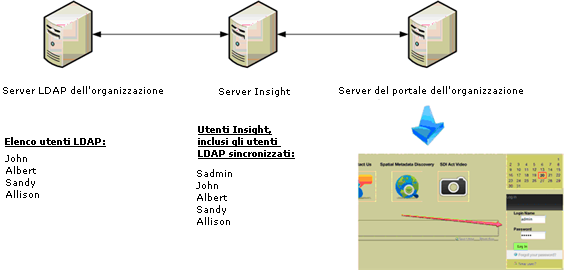
Il seguente diagramma mostra il processo di sincronizzazione degli utenti e il flusso di accesso al portale. Lo script di conversione viene configurato per l'esecuzione periodica. Lo script mantiene l'elenco di utenti LDAP aggiornato e aggiunge/rimuove gli utenti a seconda delle esigenze.
L'utente esegue l'accesso al portale dell'organizzazione. È possibile configurare il portale in modo da reindirizzare l'utente al server CA Business Service Insight o visualizzare un elenco di applicazioni disponibili. Il server CA Business Service Insight utilizza le credenziali fornite durante il primo accesso al portale.
|
Copyright © 2013 CA.
Tutti i diritti riservati.
|
|