

Dynamic targets are handled by the Business Logic using an event handler in the standard Business Logic script, similar to the Result() function which is used to the return the service level value from the Metric. The Dynamic target must be specified on the Metrics 'details' tab as shown below.
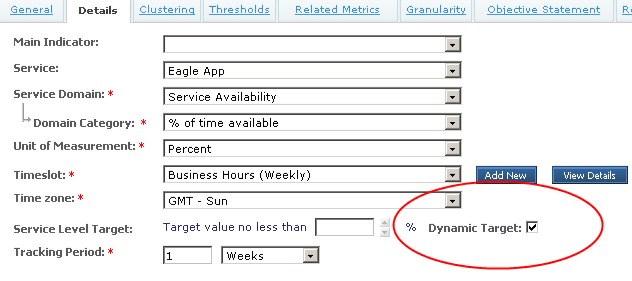
When a dynamic target is specified then the target is taken from the 'Target()' function in the Business Logic, rather than the static value specified in the Details tab of the Metric. The Target function looks like the following.
Function Target
  'TODO: ADD code here TO handle dynamic target calculation
  Target = Null
End Function
This function should be implemented based upon the requirement for the metric so as to return the desired target value for a specific period. The function can return any number that the business logic can assign to it.
For a Call Centre, the target for a Metric measuring the 'Avg Call Pickup time' may depend on the volume of calls. If there are between 0 and 800 calls the target should be < 15 seconds, if there are between 801 and 1500 calls, the target should be < 20 seconds, higher than 1500 calls the target should be less than 25 seconds. This could be implemented as follows: (assuming TotalCalls is a counter incremented for each call event received and that TotalCalls cannot be less than 0)
Function Target
  If TotalCalls >0 and TotalCalls <= 800 Then
     Target = 15
  ElseIf Total Calls > 800 and TotalCalls <= 1500 Then
     Target = 20
  Else
      Target = 25
  End If
End Function
Consider the situation where the target for a Metric may change depending on the granularity of the calculation. It may be the case that there is a daily target of 98% availability for a group of servers, but the monthly target is 99.5% availability. The solution for this requires using the dynamic target function in conjunction with the function call to Context.TimeUnit to determine the current agent which is being calculated. Hence you can adjust the target accordingly.
Function Target
  If Context.TimeUnit = “DAY” Then
     Target = 98
  ElseIf
     Target = 99.5
  End If
End Function
|
Copyright © 2013 CA.
All rights reserved.
|
|