

| Skip to main content | Return to home page |
 |
Bookshelf | |
| Product Name and Release Number |
Troubleshooting: X.509 Certificate
On rare ocassions CA Business Service Insight's Oblisync X.509 certificate is installed but lacks the correct access permissions to be able to read the private keys.
On those occassions, the result is a misfunction of the Oblisync API. An error then results when trying to connect to the server for Content Transfer.
http://my_Server/oblisync/api/ObliSyncRepository.svc
Where: "my_Server" is the name of your server.
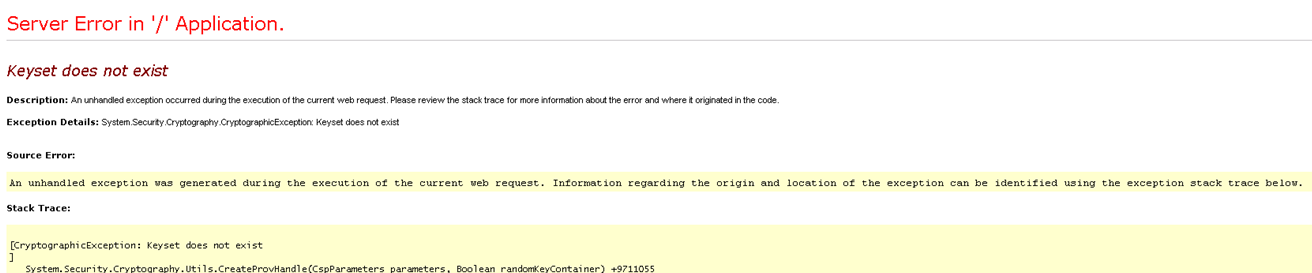
Note: This error means that the certificate is missing proper access information.
http://msdn.microsoft.com/en-us/library/windows/desktop/aa384088(v=vs.85).aspx
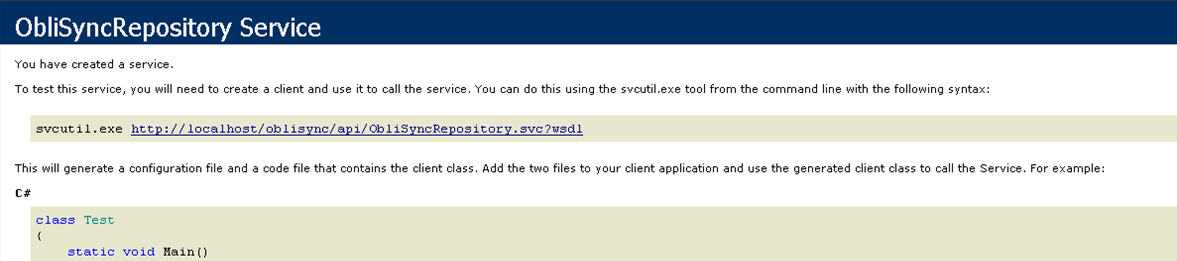
C:\Program Files (x86)\Windows Resource Kits\Tools\winhttpcertcfg -g -c LOCAL_MACHINE\TrustedPeople -s Oblisync -a everyone
http://Server/oblisync/api/ObliSyncRepository.svc
| This bookshelf may contain links to external sites that are not controlled by CA Technologies. CA Technologies is not responsible for and does not endorse the contents of these external websites. | Legal Notices | Contact Us | ca.com |
| Copyright © 2013 CA. All rights reserved. |


