

This is a typical case study for Helpdesk performance
Given the data source shown below:
|
TK No. |
TK. Priority |
Raised at |
Closed on |
Resolved at |
Cust Ref |
Location |
|---|---|---|---|---|---|---|
|
3800968 |
1 |
19/12/2003 07:51 |
05/01/2004 11:31 |
22/12/2003 12:00 |
CM3 |
London |
|
38000509 |
1 |
18/12/2003 09:21 |
05/01/2004 11:33 |
22/12/2003 12:00 |
CM1 |
Ipswitch |
|
38084199 |
2 |
07/01/2004 11:20 |
14/01/2004 09:10 |
09/01/2004 12:00 |
CM2 |
Ipswitch |
|
38188329 |
3 |
21/01/2004 09:27 |
27/01/2004 09:09 |
24/01/2004 12:00 |
CM3 |
Leeds |
|
37964069 |
3 |
12/12/2003 14:04 |
05/01/2004 11:35 |
19/12/2003 12:00 |
CM286 |
Birmingham |
|
3796448 |
1 |
12/12/2003 14:18 |
05/01/2004 11:39 |
19/12/2003 12:00 |
CM263 |
Luton |
|
37965039 |
2 |
12/12/2003 14:57 |
14/01/2004 15:05 |
18/12/2003 12:00 |
CM264 |
Leeds |
|
37970699 |
2 |
15/12/2003 09:26 |
05/01/2004 11:22 |
22/12/2003 12:00 |
CM288 |
London |
|
37997259 |
1 |
17/12/2003 15:58 |
05/01/2004 11:27 |
23/12/2003 12:00 |
CM302 |
Ipswitch |
|
38000259 |
1 |
18/12/2003 09:11 |
06/01/2004 14:44 |
29/12/2003 12:00 |
CM340 |
London |
|
38021049 |
1 |
22/12/2003 09:32 |
06/01/2004 14:28 |
31/12/2003 12:00 |
CM341 |
London |
The data source shown above lists details for helpdesk tickets that are managed for each customer in the various locations that the customer services. A single location may also be shared between customers.
The following three requirements are required for reporting when using this data source:
The above requirements indicate that the Events should be filtered by:
You need to specify which of these filtering criteria is translated as an Event Type and which is to be the relevant Resource.
How do I select an Event Type?
Of the three filtering criteria needed, the ticket priority is the most appropriate to be translated into the Event type for the following reasons:
How is a Resource selected?
The two other filtering criteria required, are the Customer and Location and these are the smallest entities that require reporting. Therefore, the combination of customer and location is the Resource.
Customer and location are relatively fixed entities and have a definite life-cycle, whereby new customers or new sites may be added. Additionally, the relationship between a site and a customer may change.
For the purposes of translations, it is possible to use more then one field from the data source. Whereas in the previous case study the server field was translated into an CA Business Service Insight Resource, in this case the Resource is built using the combination of two fields. Each permutation therefore produces a new Resource.
The Resources list is shown below:
|
Customer Field |
Site field |
Output Resource |
|
CM3 |
London |
CM3@London |
|
CM1 |
Ipswitch |
CM1@Ipswitch |
|
CM2 |
Ipswitch |
CM2@Ipswitch |
|
CM3 |
Leeds |
CM3@Leeds |
|
CM286 |
Birmingham |
CM286@Birmigham |
|
CM263 |
Luton |
CM263@Luton |
|
CM264 |
Leeds |
CM264@Leeds |
|
CM288 |
London |
CM288@London |
|
CM302 |
Ipswitch |
CM302@Ipswitch |
|
CM340 |
London |
CM340@London |
|
CM341 |
London |
CM341@London |
The output Resource is a combination of the customer and site fields using the symbol '+' to combine them. It is important to be aware of the name of the Resource since it is extracted from the data source and it appears later in the reports. The reporting abilities need to meet expectations.
Note: One of the most common mistakes when modeling a helpdesk or any ticket or incident system is to define a single incident as a Resource.
The following incorrect assumptions often lead to mistakes:
Setting Allocations for the Resources
For the first calculation requirement:
For the next two calculation requirements:
For these requirements, gather the Resources into Resource groups because the Metrics have to be clustered given that the calculation is required for each site individually.
Note: Even if the allocations of Resources for the current model and requirements are not necessary, it is important to create them keeping in mind future requirements. Doing so prevents overhead in future system development.
Choosing the Timestamp field
As mentioned previously, the Timestamp is very important to the way in which the correlation Engine handles the Events. Metrics always calculate service level per time period, and the Events that are processed within this time period are the ones whose Timestamp falls within the period.
In the first case study, the data source only has one time field. However in this case there are three possible fields that that can be set as the timestamp. Examining the first two records:
|
TK No. |
TK. Priority |
Raised at |
Closed on |
Resolved at |
Cust Ref |
Location |
|---|---|---|---|---|---|---|
|
3800968 |
1 |
19/12/2003 07:51 |
05/01/2004 11:31 |
22/12/2003 12:00 |
CM3 |
London |
|
38000509 |
1 |
18/12/2003 09:21 |
05/01/2004 11:33 |
22/12/2003 12:00 |
CM1 |
Ipswitch |
To calculate the resolution time, both the Raised at time and the Resolved at time are required. For the purposes of the Event, it is possible to attach only one Timestamp to it. Then the other can be used as a value within the value fields.
If the Raised at value is used as the Timestamp, then the ticket is included in the December results. If the Resolved at value is used as the Timestamp, then the ticket is included in the January results. Both options are viable. The selection just needs to meet expectations as to where the tickets should appear in reports.
It is very important point to consider during implementation, since it determines when events are used for calculations. For example, if a ticket is raised in November, but is not closed until December, when should it contribute towards the SLA result? Does it go into the November data, or December?
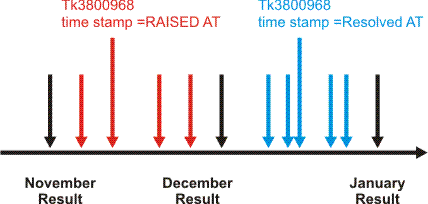
In this case, since the ticket is reported to the data source only after it is closed, the data can be captured only after the ticket is closed. Usually the Closed date is after both the Raised and Resolved dates. In a case where the Raised date was chosen to be the Timestamp, then it should be processed as part of the December results. The Closed date was in January, which means that December had already passed when this ticket was reported. Hence, the results for December had already been published. The correlation engine then notices the Event as being in the past because the Timestamp belongs to December and triggers recalculation. Therefore, the results of December change retroactively.
These consequences need to be understood completely in order to be able to define which time field must be chosen as a Timestamp. Typically, the Closed date is chosen in order to have final reports that do not change retroactively.
On the other hand, using the Closed date as the Timestamp delays tickets from entering calculations. A ticket that has been resolved may only be closed at a substantial time later.
Be aware however, that this use of the Closed date might also trigger a process in the organization that accelerates the closing time of tickets.
The final suggestion is then:
|
Event name |
Priority 1 ticket (can also be defined for other priorities if required) |
|
|
Behavior |
Reported when ticket is closed |
|
|
Timestamp field |
Closed at |
|
|
Resource field |
customer field+site field |
|
|
Event type field |
Priority |
|
|
Data fields |
All |
|
|
Resource Type attribute |
Contract Party Site |
|
|
Allocation to Contract party |
Each site is allocated to relevant Contract party |
|
|
Allocation to Service |
Same as above |
|
|
Allocation to Resource group |
Resource group is created for each Contract party to enable clustering |
|
|
Registration by |
For clustered Metrics, registration is by Resource and Metric is attached to a Resource group called Customer CM3 sites For closed time Metrics, registration is by Contract party and Service |
|
|
Copyright © 2013 CA.
All rights reserved.
|
|