

This is a typical case study for server performance.
Given the following data source structure:
|
Indication |
Server |
Measure |
Timestamp |
|---|---|---|---|
|
availability |
Appserv01 |
1 |
03/01/2001 07:44 |
|
response time |
Appserv01 |
354.6 |
03/01/2001 09:58 |
|
CPU load |
Dbserv02 |
83% |
03/01/2001 12:12 |
|
availability |
Appserv01 |
0 |
03/01/2001 14:26 |
|
CPU load |
Dbserv02 |
94.30% |
03/01/2001 16:40 |
|
capacity |
Firewall01 |
10% |
03/01/2001 18:54 |
|
response time |
Dbserv02 |
476.89 |
03/01/2001 21:08 |
|
availability |
Appserv02 |
1 |
03/01/2001 21:24 |
|
response time |
Appserv01 |
774.4 |
03/01/2001 21:48 |
|
CPU load |
Dbserv01 |
83% |
03/01/2001 21:52 |
In addition to the above, are the following calculation requirements:
Calculate the % availability of each application server.
The availability of each server should be calculated separately. Therefore, to calculate availability for a single server, it is necessary to receive events for only this specific server. In addition, the data sources contain other performance indicators that are not relevant to availability calculations (response time, capacity, and so on), so the availability indicators as well as the relevant server need to be filtered.
Since the filtering criteria in CA Business Service Insight are Event Type and Resources, translate the filtering criteria from the data source values into a definition of Resource and Event Type.
In this case, the indicator is an ideal value to translate as an Event type in CA Business Service Insight since it describes logically the type of Event. There are a limited number of types, such as, availability, response time, capacity, and CPU load. This means that for the Metrics that calculate availability for the server, the registration is for the availability Event Type.
In this case, when there are a large number of servers and it is necessary to calculate the availability of each server, it follows that each server has to be defined as a Resource. It then needs to be grouped within a Resource group and the Metric will be clustered over that Resource group.
Suggested modeling:
|
Event name |
Availability Event. |
|
Behavior |
Reported as change of status of 0 or 1. |
|
Timestamp field |
Timestamp (the only time field in the data source). |
|
Resource field |
Server (every server that appears in the data source is translated into an CA Business Service Insight resource). |
|
Event type field |
Indicator (each of the values in this field are translated into an Event type in CA Business Service Insight. There are four Event types). |
|
Data fields |
Measure is 0 or 1 (only for availability records). |
The following resource allocations should be defined:
|
Resource Type attribute |
Application Server |
|
Allocation to Contract party |
Each application server is allocated to the contract party, where the relevant server runs its application. This enables registration by contract party that retrieves all servers accordingly. |
|
Allocation to Service |
Same as above. |
|
Allocation to Resource group |
Optional. It is usually necessary to group Resources where clustering is required. |
And lastly, based upon all of the above definitions;
|
Registration by |
For the clustered Metric, calculating the availability of each server individually, the registration is by Resource. |
In order to be able to meet the above requirement the following criterion is added:
Calculate average response time of application servers for each Contract party separately.
For this requirement, it is necessary to receive Events of response times for all application servers that are part of the group of servers running applications for the specific contract party. Receiving the response time events is done by registering the Event Type created from the indication field with the value "response time". This ensures receiving only events that report on response times of servers.
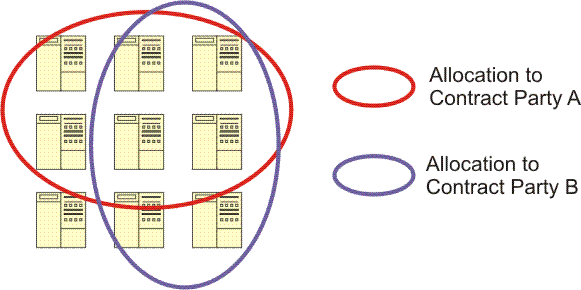
In order to receive only the Events that report on the relevant servers for a specific contract party, the resources need to be registered through the Contract party allocation.
A resource can be allocated to more than a single contract party, Service or group. Therefore, it may happen that an event that was sent for the calculation of response time as part of the Contract of contract party A, is also a part of the calculations for contract party B.
|
Copyright © 2013 CA.
All rights reserved.
|
|