

Each Metric has a definition of a tracking period. The tracking period is the period during which the Metric has to output a service level result and it is this result that should be compared against the defined target. The result produced for the tracking period is the business result, in other words, it is the contractual result for which the provider has committed to provide a certain target service level. Each instance of the Business Logic for each Time Period is known as an Agent, and is directly related to the granularities associated with each Metric.
For example, if the Metric is defined with a one month tracking period, then the Metric is executed to provide a monthly result.
In order to provide the drill down capability where the user can drill down within the monthly result to see the daily result, the Metric must have a definition of additional time units in which it should be calculated. The time units are defined in the General details section of the Metric in the Granularity tab.
For each of the time units defined in the Granularity tab of the Metric and for the tracking period, a separate Business Logic instance is executed by the Engine. Each of these instances executes the same Business Logic code, but the OnPeriodStart and OnPeriodEnd will be triggered differently for each of these instances. For the daily instance it will be triggered at a start of day and at the end of day. For each time unit it will be triggered according to the time unit start and end points.
Each of the Business Logic instances is executed in order to produce the relevant time unit result. In addition, each period has to have a result that takes any exceptions into account. Any period that does not do so, (if exceptions are defined) must allow the user to choose whether to see the service level result with or without the exceptions that were taken into consideration. Due to this requirement, each Metric will potentially have fourteen Agents (instances) executed by the Engine, two Agents for the business results and twelve for the six additional operational periods.
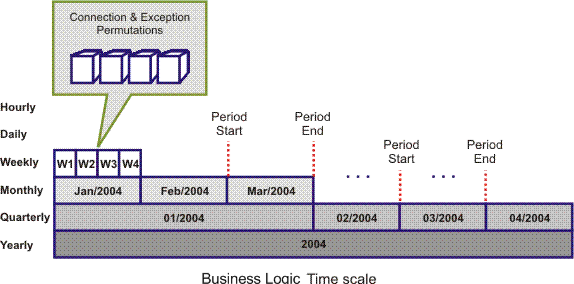
This means that the granularity definition has a serious impact on the calculation Engine performance because each time period is calculated for a different Agent. So, in cases where the drill down capability is not required as a whole or partly, it is recommended that some of the Agents are turned off. This has an especially large impact in the case of the lower granularities such as hourly results. It also has an enormous impact for Clustered Metric, since the Engine does all of the above calculations for each ClusterItem it encounters. In effect it treats each ClusterItem as a new Metric. For example, when calculating a Metric across a resource group of 50 items, there will be 49 times more work for the Engine to do, compared with the same non-clustered Metric.
For example, if the Metric is set to calculate the resolution time in number of days, then an hourly result is meaningless, and should be unchecked on the granularities tab to avoid the Engine performing needless calculations.
The TimeUnit attribute of the Context object (i.e context.TimeUnit in the Business Logic) returns the time unit of the agent currently executing, where the possible returned values are: HOUR, DAY, WEEK, MONTH, QUARTER, YEAR.
For example, for the daily Agent the Context.TimeUnit will return "DAY".
The IsTrackingPeriod attribute of the Context object will return True for the Agent that calculates the tracking period time unit. Its also important to note that the Agents shown in the Granularity tab of the Metrics are additional to the Agent of the tracking period of the Metric. So, even for a Metric with a monthly tracking period you can turn off the monthly agent and it will still calculate the monthly service level, but only as 'Business results'.(Non-operational results)

As mentioned above, the various Agents usually execute the same Business Logic code, but there are cases in which it is necessary to have a slightly different logic applied.
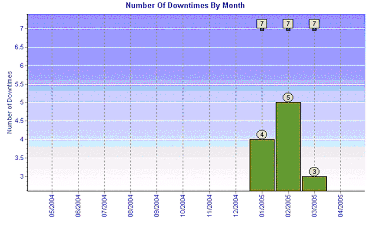
For example, in the monthly case, the result should be the number of down times for each month separately as shown below:
For the daily drill-down it may be necessary to be able see the cumulative down times, where each day is a sum of all the days from the beginning of the month. This method should be applied to all time units smaller then a single month as shown below:
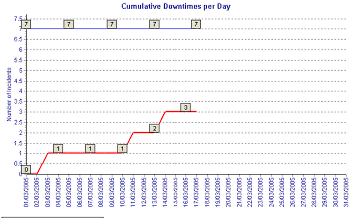
The difference between the two time units is that for the Agent calculating the tracking period the down time counter will be initialized to 0 at the beginning of every period, but for the daily Agent the counter will be initialized only in a case where the day is the first day of the month.
The following is the OnPeriodStart event handler:
Sub OnPeriodStart(time)
     If InStr(“MONTH,QUARTER,YEAR”, Context.TimeUnit) > 0 _
 Or (Context.TimeUnit = “DAY” And Day(time) = 1) _
 Or (Context.TimeUnit = “HOUR” And Day(time) = 1 And Hour(time) = 0) Then
          DownTimeCounter = 0
     End If
End Sub
Recalculation is performed when the Correlation engine identifies that a Metric's final periodic result is no longer valid and it must therefore recalculate the results.
Recalculation may be caused by:
The most efficient method for registration is by Contract Party and Service. Arranging the resources under Contract Party and Services is a way in which to express the logical relationship between the data layer and the business layer in the system. Registering resources through these entities will require no changes to the formulas when used in different Contracts or when they are used for different Services. The Metric's current context identified the contract and service, which defines the relevant Contract Party and associated Service. The Business Logic formulas that are defined in this type of registration are easily reusable because they do not need any changes in the registration.
|
Copyright © 2013 CA.
All rights reserved.
|
|